Best AI Coding Tools in 2026: Prices, Plans and Which One to Use (UK Guide)
14 AI coding tools compared on price, billing and how they treat your code, checked on 21 October 2026, with a plain guide to choosing one.

AI coding tools changed more in 2026 than in the two years before it. Cursor changed hands and now sells plans bundled with Grok. Windsurf became Devin Desktop. Google retired Gemini CLI for most individual users in favour of Antigravity CLI. Amazon is steering Q Developer users towards Kiro. GitHub moved Copilot to a credit system. Any comparison written in 2025 is now wrong on prices, plan names or both.
This guide covers the 14 tools that matter for UK developers and businesses in late 2026. For each one you get what it actually is, which models it uses, the free tier, the paid plans with billing options, the team and enterprise route, and what the vendor says about your code and data. Every price was checked on the vendor’s own pricing page on 21 October 2026. Prices are in US dollars because that is what every vendor in this list shows, and they exclude VAT unless stated.
We build and maintain the Indexify website and client sites with AI coding agents, mainly Claude Code and OpenAI Codex, so the practical sections draw on how we work. We have not run benchmarks for this article, and we do not quote anyone else’s.
The short answer
If you only read one section, read this one.
- A developer who wants an agent to do whole tasks: Claude Code or OpenAI Codex. Both run in your terminal, read the repository, run your tests and are included in the $20 a month personal plans.
- A team that lives in GitHub: GitHub Copilot. Business is $19 per seat, covers editor, terminal and cloud agents, and does not train on your data.
- An existing JetBrains shop: JetBrains AI and Junie, which may already be included in your All Products Pack.
- Heavy AWS users: Kiro, Amazon’s agentic IDE, which is replacing the Q Developer IDE plugins.
- A non-developer building a prototype: Lovable, Bolt, v0 or Replit. Treat the result as a prototype until a developer has reviewed it.
- Anyone handling client or regulated code: whichever tool you choose, buy the Business or Enterprise tier. That is where no-training-by-default, single sign-on and audit logs live.
Four kinds of AI coding tool
Most “best AI coding tools” lists compare products that do different jobs. Sort them by where the work happens first, then compare within a group.
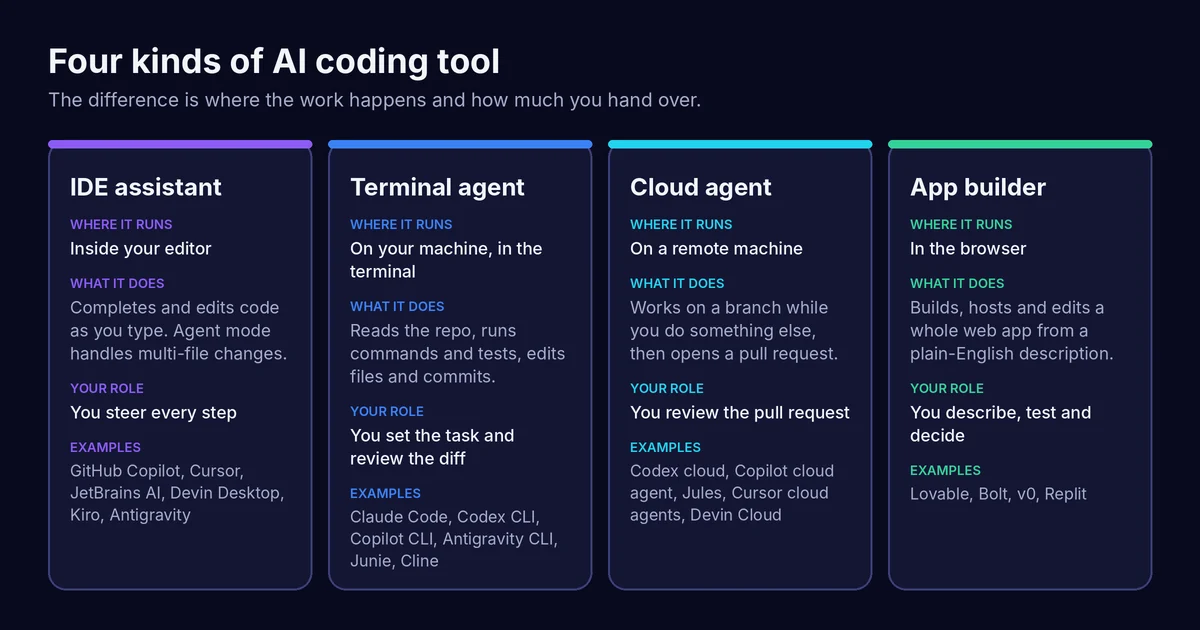
IDE assistants sit inside your editor. They complete code as you type and, in agent mode, make changes across several files while you watch. GitHub Copilot, Cursor, JetBrains AI, Kiro, Devin Desktop and the Antigravity IDE are here.
Terminal agents run on your machine with access to your repository and your command line. You give them a task, they read the code, run commands and tests, edit files and commit. Claude Code, the Codex CLI, Copilot CLI, Antigravity CLI, Junie and Cline all work this way.
Cloud agents do the same job on a remote machine. You assign a task, carry on with something else, and review a pull request when it is done. Codex cloud, the Copilot cloud agent, Jules, Cursor’s cloud agents and Devin Cloud are examples.
App builders run in the browser and build, host and edit a whole web app from a description. Lovable, Bolt, v0 and Replit are aimed at people who do not want to touch the code at all.
Most of the big names now span more than one group. Codex has a CLI, an IDE extension, a desktop app and a cloud agent. Copilot has all four surfaces. The group still tells you what you are really buying.
The comparison table
All prices checked 21 October 2026 on the linked pricing pages. USD, excluding VAT. “Cheapest paid plan” is the lowest monthly price for an individual unless stated.
| Tool | Type | Free tier | Cheapest paid plan | Pricing model | Best for |
|---|---|---|---|---|---|
| Claude Code | Terminal agent that works alongside IDEs | No (not in Claude Free) | Pro: $20/month, or $17/month billed annually | Subscription with usage limits; API pay-as-you-go also possible | Developers who want an agent to own whole tasks |
| OpenAI Codex | Terminal agent, IDE, desktop app, cloud agent | Yes, light model in the desktop app, subject to rollout | Go: $8/month (light model); Plus: $20/month for full Codex | Subscription with five-hourly and weekly limits, plus credits or API key | Developers already paying for ChatGPT |
| GitHub Copilot | IDE, CLI, cloud agent, code review | Yes, limited AI credits, auto model only | Pro: $10/month | Monthly AI credit allowance; 1 credit = $0.01 for overage | Teams that live in GitHub |
| Cursor | AI code editor, CLI, cloud agents | Yes, limited agent and chat requests | Plus: $8/month (Grok models only); Premium: $30/month | Weekly usage pool; third-party models billed at API list price | Developers happy with Grok models or paying per use for others |
| Devin Desktop (formerly Windsurf) | AI code editor, cloud agent | Yes, light agent quota, unlimited Tab | Pro: $20/month | Daily and weekly quota; extra usage at API pricing | Teams also using Devin’s cloud agent |
| Google Antigravity | Agent app, IDE, CLI, SDK | Yes, basic weekly rate limits | Google AI Pro: $19.99/month (US page) | Rate limits by plan plus flexible AI credit pool | Google Cloud and Gemini users |
| Jules | Cloud agent | Yes, 15 tasks a day | Via Google AI Pro | Tasks per day by plan | Delegating chores on GitHub repos |
| JetBrains AI and Junie | IDE assistant and agent, CLI | Yes, AI Free plus Junie Lite | AI Pro: $10/month list | AI credits per 30 days; top-ups at $1 per credit; or bring your own key | JetBrains IDE users |
| Kiro (Amazon) | Agentic IDE, CLI, web | Yes, 50 credits | Pro: $20/user/month | Credits; add-ons at $0.04 per credit | AWS teams, spec-driven work |
| Replit | Browser app builder and IDE | Free start | Core: $20/month, or $18/month billed annually | Subscription plus usage credits | Building and hosting apps in one place |
| Lovable | Browser app builder | Yes, 5 credits a day, up to 30 a month | Pro: $25/month for 100 credits, or $250/year | Credit tiers per workspace, not per seat | Non-developers building web apps |
| Bolt | Browser app builder | Yes, 1M tokens a month | Pro: $18/month billed annually ($216/year) | Token allowance with rollover | Quick prototypes and small business sites |
| v0 (Vercel) | Browser app builder | Yes, 7 messages a day | Plus: $30/user/month | Included credits plus token-priced usage | React and Next.js front ends on Vercel |
| Cline | Open-source agent for VS Code and CLI | Yes, the extension is free | None; you pay for model usage | Bring your own API key or buy inference at cost | Developers who want full control of models and cost |
Three things jump out. Almost nothing is a flat fee any more: every paid plan comes with a usage allowance, and heavy use costs extra. Around $20 a month is the entry point for serious agent work with Claude Code, Codex, Devin Desktop and Kiro; Copilot starts lower at $10. And privacy terms differ sharply between personal and business plans, which matters more than any feature difference for client work.
Tool by tool
Claude Code
What it is. Anthropic’s coding agent. It runs in the terminal and works alongside popular IDEs. It reads your repository, runs commands and tests, edits files and works through multi-hour refactors and migrations. Anthropic added self-hosted environments in public beta in August 2026, so sessions can run inside your own network.
Models. Claude’s own models. Pro and above get Opus, Sonnet and Haiku. Fable, Anthropic’s newest model family, is available through usage credits on Pro and at up to half of the weekly limits on Max and Team premium seats.
Free tier. None. Claude Code is not included in Claude Free.
Paid plans.
- Pro: $20 a month billed monthly, or $17 a month on annual billing ($200 up front).
- Max: from $100 a month (5x Pro usage) or $200 (20x), monthly billing only. Max now includes $100 or $200 a month in API credits for building on the Claude Platform.
- Team (2 to 150 people): standard seat $25 monthly or $20 a month billed annually; premium seat $125 monthly or $100 annually with 5x the usage.
- Enterprise: $20 per seat per month billed annually, 20-seat minimum, plus usage charged at API rates.
- API: sign in with a Claude Console account and pay per token. On the API price list, Sonnet 5.5 is $2 per million input tokens and $10 per million output tokens; Opus 5.5 is $4 and $20.
Data and privacy. Free, Pro and Max are listed as “opt-out” for model training, so switch it off if you use a personal plan for anything sensitive. Team and Enterprise state no training on your content by default. Enterprise adds audit logs, SCIM, custom data retention, IP allowlisting and a Compliance API. Regional processing within the EU is available when you use Claude through AWS Bedrock or Google Vertex; Anthropic’s regional compliance page does not list a UK-specific option.
Best for. Developers who want to hand over whole tasks and review the result. This is one of the two agents we use most at Indexify. Our older Cursor guide covers the editor-first alternative.
OpenAI Codex
What it is. OpenAI’s coding agent, available as a CLI, an IDE extension, a desktop app, on iOS and as a cloud agent that works on GitHub repositories and can review pull requests. Codex now shares its usage allowance with ChatGPT’s agentic features.
Models. On ChatGPT sign-in, the current models are GPT-6.1 Sol, GPT-6 Sol, GPT-6 Astra and the lighter GPT-6 Luna. GPT-5.5 was retired from Codex with ChatGPT sign-in on 14 October 2026.
Free tier. Free and Go users get GPT-6 Luna at standard speed in the desktop app, subject to rollout. That is useful for light tasks, not for agent work on a real codebase.
Paid plans.
- Go: $8 a month (same light model access as Free).
- Plus: $20 a month. Codex on the web, CLI, IDE extension and iOS, plus automatic code review and Slack integration. OpenAI estimates 15 to 160 local messages per five hours on GPT-6.1 Sol, depending on the task, with weekly limits on top.
- Pro: $100, $200 or $500 a month, with no five-hour limit at present.
- Business: $20 per user per month billed annually (two or more users), or $25 monthly.
- Enterprise and Edu: contact sales.
- API key: run the CLI, SDK or IDE extension and pay standard API rates. No cloud features with a key.
Data and privacy. Business and Enterprise state no training on your business data by default. Enterprise adds SCIM, role-based access, audit logs through the Compliance API, and data retention and residency controls. OpenAI’s help centre lists the United Kingdom as a data residency region for storage at rest on Enterprise and Edu, and says the Codex app and CLI are supported for residency while Codex Web is not. Inference residency is offered in Europe, the US and the UAE, not the UK.
Best for. Teams already on ChatGPT Business who want an agent without another vendor. The other agent we use regularly.
GitHub Copilot
What it is. The broadest product here: completions and chat in the editor, agent mode, a CLI, a desktop app, a cloud agent, and automated pull request review. On Pro+ and Max you can also hand tasks to third-party agents from Anthropic and OpenAI, currently in preview.
Models. A long list from Anthropic, OpenAI, Google, xAI, Moonshot and Microsoft, including Claude Opus 5.5, GPT-6.1 Sol and Gemini 4 Argon. Free and Student plans get automatic model selection only.
Free tier. Copilot Free includes an allowance of AI credits, agent mode and the CLI, but not the cloud agent or code review.
Paid plans. GitHub replaced premium requests with GitHub AI Credits. One credit is worth $0.01.
- Pro: $10 a month, 1,500 credits in total (1,000 base plus a 500 flex allotment).
- Pro+: $39 a month, 7,000 credits.
- Max: $100 a month, 20,000 credits.
- Business: $19 per seat per month, 1,900 credits per user, pooled across the organisation.
- Enterprise: $39 per seat per month, 3,900 credits per user, requires GitHub Enterprise Cloud.
Code completions and next-edit suggestions do not use credits on paid plans. Above your allowance you set a dollar budget.
Data and privacy. This is the one to read carefully. From 24 April 2026, GitHub may use prompts, suggestions and code snippets from Free, Pro and Pro+ users to train models unless you opt out in account settings. Business and Enterprise data is not used for training, and prompts from IDE chat and completions are not retained. Organisation plans add policy management, content exclusion, audit logs and a setting to block suggestions that match public code. GitHub lists IP indemnity among the features individual plans do not include.
Best for. Teams whose code, issues and reviews already live on GitHub. Our article on AI code review tools covers how to introduce automated review without the team tuning it out.
Cursor
What it is. The AI-first code editor built on VS Code, with an agent, a CLI, cloud agents, automations and Bugbot for code review. Cursor’s parent company was bought by SpaceX’s AI business in 2026 according to press reports, and in mid-October 2026 its pricing page switched to combined plans that also cover Grok and X features.
Models. Grok models are included in the plan allowance. Third-party models from Anthropic, OpenAI and Google are still available in Cursor, but on every plan they are billed separately at API list price.
Free tier. Limited agent and chat requests.
Paid plans.
- Plus: $8 a month, Grok models only.
- Premium: $30 a month, 4x Plus usage, adds cloud agents, code hosting and Bugbot reviews.
- Super: $100 a month, 15x Plus usage.
- Ultra: $200 a month, 50x Plus usage.
- Teams: from $30 per user per month, pooled usage, SSO and team privacy settings.
- Enterprise: custom, with SCIM, audit logs, granular spend controls and model and MCP access controls.
Usage refreshes weekly. Above it you buy top-ups or wait.
Data and privacy. With privacy mode on, Cursor says code data is not used for training by Cursor or its model providers. Team admins can enforce it.
Best for. Developers who like the editor and are comfortable either working with Grok models or paying per use for Claude, GPT or Gemini. Budget for that second line: if your team relies on non-Grok models, the plan price is only part of the bill. Our Cursor guide goes into the plans and the ownership change in more detail.
Devin Desktop (formerly Windsurf)
What it is. Windsurf’s owner, Cognition, rebranded it as Devin Desktop in June 2026, and windsurf.com now redirects to Devin’s pricing page. It is a VS Code-based editor with an agent, Tab completions and access to Devin Cloud, Cognition’s cloud agent.
Models. Frontier models from OpenAI, Anthropic, Google and SpaceXAI plus open-source models, and Cognition’s own SWE-2, which is free to use on Pro.
Free tier. A light agent quota, limited models, unlimited Tab completions and inline edits.
Paid plans.
- Pro: $20 a month, with Devin Cloud access and extra usage at API pricing.
- Max: $200 a month.
- Teams: $80 a month for the team plan plus $40 a month per full developer seat, up to 200 users.
- Enterprise: on request, including VPC deployment and SAML or OIDC SSO.
Quotas refresh daily and weekly.
Data and privacy. The pricing page does not set out training terms; check Cognition’s data use policy before using it on client code.
Best for. Existing Windsurf users and teams that want an editor and a cloud agent from one vendor.
Google Antigravity
What it is. Google’s agent-first development platform: a desktop app, an IDE, IDE extensions, a CLI and an SDK. On 18 June 2026 Google stopped serving Gemini CLI and the Gemini Code Assist IDE extensions for consumers on Google AI Pro and Ultra and for free Gemini Code Assist users, replacing them with Antigravity CLI. Enterprise Gemini Code Assist licences and paid API keys keep Gemini CLI access.
Models. Gemini models, including Gemini 4 Argon for Google AI Pro and Ultra subscribers.
Free tier. Yes, for individuals: access to a range of agent models, unlimited Tab completions and command requests, and basic weekly rate limits.
Paid plans. Through Google’s consumer AI plans. On Google’s US subscriptions page, Google AI Pro is $19.99 a month with entry-level Antigravity rate limits, and Google AI Ultra starts at $99.99 a month. Google shows prices by region and we could only check the US page, so confirm the UK price at sign-up. For organisations, Antigravity is available through Google Cloud: eligible Gemini Enterprise customers can use Standard or Plus plans from $30 per seat per month, or a pay-as-you-go plan with no seat fee, with spend caps across API and subscription use.
Data and privacy. Business use runs under Google Cloud terms. Check which terms apply before using a personal Google AI plan on company code.
Best for. Teams on Google Cloud, and individuals who want a capable free tier to experiment with.
Jules
What it is. Google’s asynchronous cloud agent. You pick a GitHub repository and branch, describe the task, Jules clones it to a cloud VM, writes a plan for you to approve, then produces a diff and a pull request. You can also assign work by labelling a GitHub issue.
Plans. Free: 15 tasks a day, 3 at once. With Google AI Pro: 100 tasks a day, 15 at once. With Ultra: 300 tasks a day, 60 at once.
Best for. Clearing a backlog of small, well-defined chores such as dependency bumps and test fixes, where reviewing a pull request is quicker than doing the work.
JetBrains AI and Junie
What it is. AI assistance built into IntelliJ IDEA, PyCharm and the rest of the JetBrains family, plus Junie, JetBrains’ coding agent. Junie now runs in the terminal, inside JetBrains IDEs, from GitHub issues and pull requests, and in GitLab CI. It supports plan mode with plans saved to the repository, and lets you plan on one model and implement on a cheaper one.
Models. Junie supports models from Anthropic, OpenAI, Google and xAI, and you can bring your own key, including locally running models.
Free tier. AI Free includes 3 AI credits per 30 days. Junie Lite is a free model available in every JetBrains account. Bring-your-own-key use is billed by your provider with no JetBrains markup.
Paid plans. JetBrains’ licensing documentation lists AI Pro at $10 a month with 10 AI credits per 30 days and AI Ultimate at $30 with 35 credits. The Junie pricing page shows $8.33 and $25 per user per month, which appear to be the annual-billing rates. Top-up credits cost $1 each and last 12 months. AI Pro is included free with the All Products Pack and dotUltimate. Note that JetBrains’ own help page currently shows two different sets of tier figures, so confirm in your account before you buy.
Best for. Teams already paying for JetBrains IDEs. Check whether AI Pro is already in your licence before buying anything else.
Kiro (Amazon)
What it is. Amazon’s agentic IDE, with a CLI, a web version and spec-driven development: you write or refine a spec, and Kiro turns it into tasks. AWS will end support for the Amazon Q Developer IDE plugins on 30 April 2027 and recommends Kiro as the replacement.
Models. “Auto” by default, which mixes frontier and specialised models. You can also pick Claude models including Opus 5 and Sonnet 5, OpenAI’s GPT-5.6 family, and open-weight models such as Qwen3 Coder Next and DeepSeek 3.2.
Free tier. 50 credits, with Claude Sonnet 4.5 and open-weight models, subject to rate limits.
Paid plans. All per user per month, for teams from 2 to 500:
- Pro: $20, 1,000 credits.
- Pro+: $40, 2,000 credits.
- Pro Max: $100, 5,000 credits.
- Power: $200, 10,000 credits.
Add-on credits cost $0.04 each and last 12 months. Unused monthly credits do not roll over. Enterprise adds centralised billing, SSO and optional overages, which are off by default.
Best for. AWS-heavy teams and anyone who prefers to agree a written spec before the agent starts.
Replit
What it is. A browser-based platform where an agent builds, runs and hosts apps, with databases and integrations included. It suits people who want everything in one place and nothing installed locally.
Plans. You can start free. Core is $20 a month, or $18 a month billed annually, and includes $20 towards more powerful models. Pro is $100 a month, or $90 billed annually, with $100 towards the most powerful models, 10 parallel agents, up to 15 collaborators and 28-day database rollback. Enterprise adds SSO, SCIM, audit logs and private networking.
Best for. Founders and small teams who want an idea live on the internet quickly, and are happy for it to live on Replit.
Lovable
What it is. A browser app builder: you describe the app, Lovable builds it, and it can host the app and its backend. Our full Lovable review covers what it builds well and where it breaks.
Free tier. 5 build credits a day, up to 30 a month, plus small monthly grants for hosting and AI features. Lovable’s examples put a simple style change at about 0.5 credits and adding authentication at about 1.2.
Paid plans. Priced per workspace, not per seat: invite as many people as you like and they share the credits. Pro starts at $25 a month for 100 credits ($250 a year on annual billing, two months free) and scales to $2,250 a month for 10,000 credits. Business starts at $50 a month for 100 credits and adds SSO, role-based access and a security centre. Enterprise has volume pricing, SCIM, audit logs and EU inference. Monthly plan credits roll over and expire two months after issue.
Data and privacy. Workspace data is excluded from model training by default on Business and Enterprise. On Free and Pro you opt out per account. Lovable says you own the code and projects you build.
Best for. Non-developers building internal tools and prototypes. Code editing and download need a paid plan.
Bolt
What it is. A browser app and website builder with hosting, databases and custom domains.
Free tier. 1 million tokens a month with a 300,000 daily limit, Bolt branding on published sites.
Paid plans. Pro is $18 a month billed annually ($216 a year, against $300 a year on monthly billing), with 10 million tokens a month, rollover, custom domains and newer models. Teams is $27 per member per month billed annually ($324 a year, against $360 on monthly billing). Enterprise is priced by consumption and adds SSO, audit logs and data governance. Bolt notes that larger projects use more tokens per message because the project files are synced to the model.
Best for. Fast prototypes and small business sites where token-based limits are easier to reason about than credits.
v0 by Vercel
What it is. Vercel’s app builder, strongest on React and Next.js front ends that deploy to Vercel. It has a visual design mode and GitHub sync.
Plans. Free allows 7 messages a day. Plus is $30 per user per month with $30 of included credits plus $2 of free daily credits. Business is $100 per user per month and opts out of training by default. Enterprise guarantees your data is never used for training and adds SAML SSO. Beyond credits, usage is priced per token; v0 Pro, for example, is $2 per million input tokens and $10 per million output.
Best for. Teams already on Vercel who want front-end prototypes they can hand to developers.
Cline
What it is. An open-source coding agent for VS Code, with a CLI. Enterprise customers also get a JetBrains extension.
Pricing. The extension is free. You pay only for model usage, either with your own API keys from providers such as Anthropic, OpenAI, Google, OpenRouter, AWS Bedrock or Google Vertex, or by buying inference through Cline at cost. Enterprise is custom and adds SSO, role-based access, audit logs and VPC deployment.
Best for. Developers who want to choose the model, see every token and avoid a subscription. Pair it with a provider spend limit.
A note on Tabnine and Amazon Q Developer
Tabnine, long the privacy-focused choice, was acquired by testing company Tricentis in July 2026, and tabnine.com now leads to Tricentis. If you use it, ask your account manager about the roadmap before renewing. Amazon Q Developer’s IDE plugins are supported until 30 April 2027; plan your move to Kiro or another tool before then.
How we use AI coding agents at Indexify
Indexify’s own website runs on Astro and deploys automatically when changes reach the main branch on GitHub. A push to main is a release. That makes the working pattern matter more than the choice of tool.
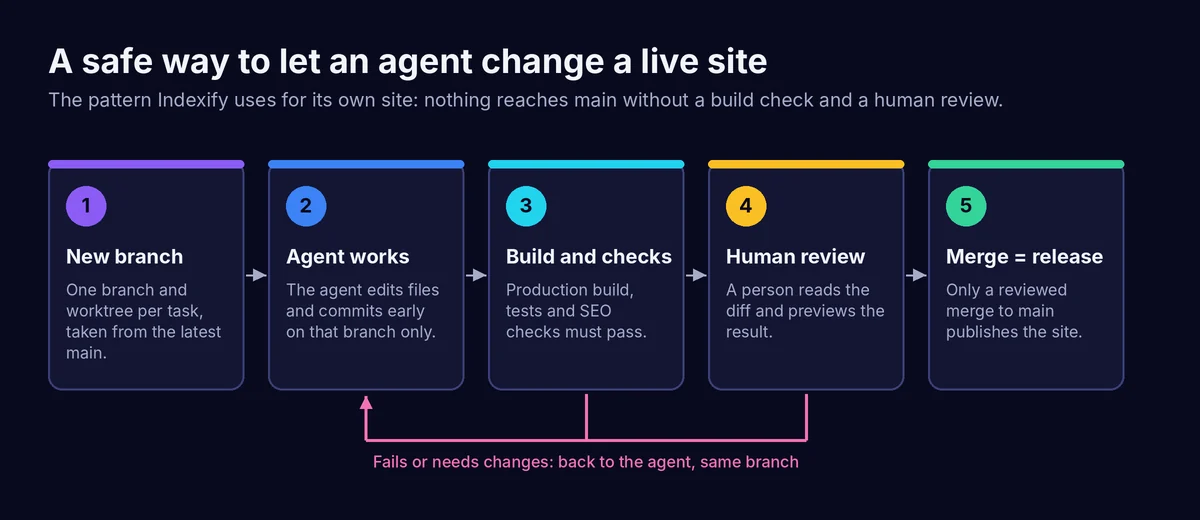
One branch and worktree per task. Every change, whether it is an article, a bug fix or a new page, starts in its own git worktree on a fresh branch from the latest main. The agent never works in the main checkout. Two agents can work on two tasks at once without touching each other’s files.
One rules file every agent reads. We keep the house rules in an AGENTS.md file at the root of the repository, and point Claude Code’s CLAUDE.md at it, so Claude Code and Codex follow the same instructions: British English, never backdate an article, never push to main, where research notes go, what must never be committed.
A build that checks more than the build. npm run build runs the site build and then our own SEO checks. The build fails if the XML and HTML sitemaps disagree, if a canonical page is missing from the sitemap, or if a contact link names a service the contact form does not offer. Agents are good at fixing problems a script reports clearly, and poor at noticing problems nobody told them to look for.
A person reviews before anything reaches main. The agent pushes its branch and hands over. Jon reads the diff and the preview, then merges. Merging is the release, and it stays a human decision.
None of this is specific to one vendor. It works the same with any terminal or cloud agent, and it is the single most useful thing to copy from this article.
Which one should you use?
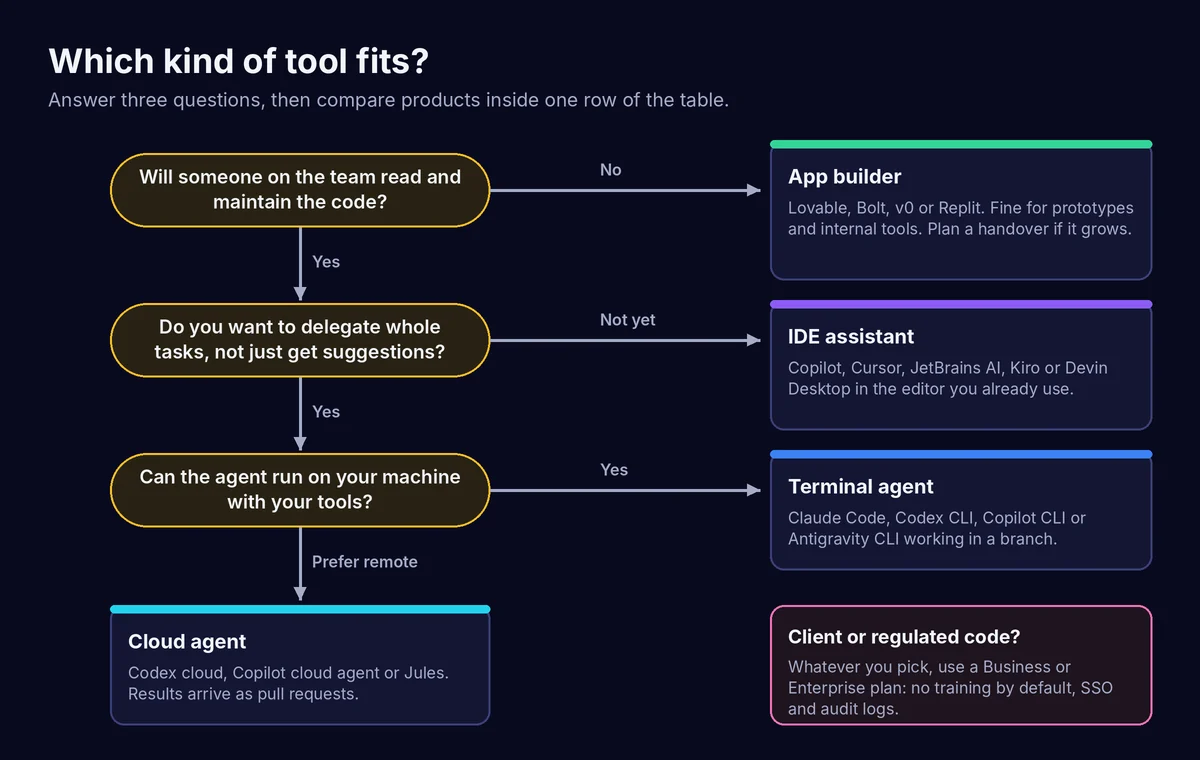
Solo developer or freelancer
Start with one $20 a month plan that includes a terminal agent: Claude Pro or ChatGPT Plus. Both include an agent that can work on a real repository, and both let you upgrade when you hit limits rather than paying for headroom you do not use. If you want inline completions in your editor as well, Copilot Pro at $10 a month adds them, and completions do not use its credits. Try the free tiers of Antigravity, Kiro and Devin Desktop before committing to a second subscription.
If you work on client code, switch off model training on personal plans, or move to a Team or Business plan as soon as a client asks how their code is handled.
Agency or small development team
Pick one agent for the whole team so your rules file, review habits and prompts are shared. Then buy it on a business plan:
- Already on GitHub: Copilot Business at $19 per seat gives editor, CLI, cloud agent and PR review with pooled credits.
- Want the strongest terminal agent: Claude Team (from $20 per seat annually) or ChatGPT Business for Codex (from $20 per user annually).
- JetBrains IDEs: check whether AI Pro is already in your All Products Pack.
Set per-member spend limits on day one. Agree the branch, build and review pattern above before anyone gives an agent write access to a client repository.
Non-developer building a prototype
Lovable, Bolt, v0 or Replit will get a working app in front of people quickly. Pick by where you want it to live: Vercel (v0), Replit’s own hosting (Replit), or a builder with its own hosting and custom domains (Lovable, Bolt). Three rules: keep real customer data out until a developer has reviewed security; make sure your plan lets you export the code (Lovable needs a paid plan for that); and treat the result as a prototype. If it starts earning money, budget for a developer to review it, ideally with one of the agents above. Our article on what happens when AI writes most of the code explains why review becomes the bottleneck.
Enterprise or regulated business
Shortlist on governance first and features second. The questions that matter:
- Training: does the plan train on your code by default? Copilot Business and Enterprise, Claude Team and Enterprise, ChatGPT Business and Enterprise, v0 Business and Enterprise and Lovable Business and Enterprise all say no by default.
- Data residency: OpenAI lists UK storage at rest for ChatGPT Enterprise, covering the Codex app and CLI but not Codex Web. Anthropic offers EU regional processing through AWS Bedrock and Google Vertex. Lovable offers EU inference on Enterprise. If UK residency is a hard requirement, get it in writing for the exact product you will use.
- Identity and audit: SSO, SCIM and audit logs are Enterprise features almost everywhere.
- Spend control: organisation-level budgets and per-user caps.
- Exit: can you move away without losing work? Agents that work in your own git repository are easier to leave than platforms that host the code.
Put the decision inside your AI policy. Our AI governance framework and AI policy template cover the wider controls, and if you sell into the EU, read our guide to the EU AI Act for UK businesses.
Controlling costs on usage-based tools
The headline price is now the minimum, not the bill. Here is how to keep the gap small.
Know what one task costs. On API pricing, a session that reads 2 million input tokens and writes 100,000 output tokens on Claude Sonnet 5.5 would cost about $5 (2 × $2 plus 0.1 × $10), before any prompt caching discount. The same session on Opus 5.5 would be about $10. That is an illustration from the published rates, not a measurement, but it shows why large repositories and long sessions cost more: agents read far more than they write.
Use the built-in controls.
| Tool | Spend control the vendor provides |
|---|---|
| GitHub Copilot | Set a dollar budget for credits above your allowance; pooled credits and admin controls on Business and Enterprise |
| Cursor | Spending caps on third-party model usage; weekly allowance refresh; group spend limits on Enterprise |
| Claude | User and organisation spend controls on Team and Enterprise |
| Codex | Usage dashboard; /status in the CLI shows remaining limits; credits for Plus and Pro |
| Kiro | Add-on packs bought in advance; Enterprise overages off by default |
| JetBrains AI | Admins set a monthly top-up limit per subscription |
| Lovable | Per-member, per-project and workspace credit limits with alerts |
| Cline | Whatever limit you set with your model provider |
Match the model to the job. Several vendors now recommend this directly. Devin suggests smaller models for routine tasks, Junie lets you plan on a strong model and implement on a fast one, and Kiro’s Auto mode costs fewer credits than picking a premium model. Use the most capable model for planning and tricky debugging, and a cheaper one for routine edits.
Keep tasks small and specific. A clear task on a clean branch finishes in fewer turns than an open-ended one. Plan modes help: agree the plan, then let the agent execute.
Watch speed multipliers. OpenAI’s Fast mode uses included allowance at 2.5 times the standard rate, and Ultrafast at up to 8 times. Anthropic’s fast mode for Opus 5.5 costs twice standard pricing. Worth it for a demo, rarely for routine work.
Review usage weekly for the first month. Most of these tools refresh allowances weekly or monthly. A weekly look at the dashboard tells you whether you are on the right tier long before the invoice does.
Using AI coding tools safely in a business
Review every change. An agent can be confidently wrong in ways that pass a quick read. Require a human review before merge, and make your automated checks catch what matters to you: tests, type checks, linting, accessibility and, for websites, SEO basics. Automated reviewers help, but they miss whole categories of problem.
Keep secrets out of reach. Agents read files and run commands. Keep .env files and credentials out of the repository, use the tool’s ignore or exclusion settings for sensitive paths, give agents the least access that lets them do the job, and never paste production keys into a chat. Prefer approval prompts for commands that touch the network or delete files.
Check the training setting. On personal and Pro plans from GitHub, Anthropic and Lovable, training is something you opt out of. On business plans it is off by default. Do not assume; check the setting for every account that touches client code.
Understand ownership and licensing. Lovable states that you own what you build, subject to third-party rights in the underlying models. GitHub offers a setting to block suggestions that match public code and lists IP indemnity as a feature outside its individual plans. Read your vendor’s terms on output ownership and indemnity before shipping AI-written code in a product you sell, and keep your normal open-source licence checks in the pipeline.
Log what the agent did. Small, frequent commits with clear messages give you an audit trail and an easy way back. Enterprise plans add audit logs; on smaller plans, git history is your log.
Write it down. A short internal policy covering which tools are approved, which plans, which data they may see and who reviews their output saves arguments later. Our AI policy template is a starting point.
Frequently asked questions
What is the best AI coding tool in 2026?
There is no single best tool, because they do different jobs. For agent work on a real codebase, Claude Code and OpenAI Codex are the strongest starting points at $20 a month. For a team on GitHub, Copilot Business is the most complete package at $19 per seat. For non-developers, Lovable, Bolt, v0 or Replit.
Is there a free AI coding tool that is good enough for real work?
For light work, yes. Copilot Free, the free Antigravity tier, Kiro’s 50 free credits, Junie Lite, Devin Desktop’s free plan and 15 Jules tasks a day are all genuinely usable. Cline is free if you pay for model usage yourself. For sustained agent work on a business codebase you will hit the limits quickly, and the free tiers come with the weakest privacy terms.
Do AI coding tools train on my code?
It depends on the plan, not the brand. Business and Enterprise plans from GitHub, Anthropic, OpenAI, Vercel and Lovable say they do not train on your data by default. Personal plans are often opt-out: GitHub began using Free, Pro and Pro+ interaction data for training from 24 April 2026 unless you opt out, and Anthropic lists training as opt-out on Free, Pro and Max. Cursor does not train on code when privacy mode is on.
Can I pay in pounds?
Every vendor in this list shows US dollar prices on its pricing page. Some charge in local currency at checkout (JetBrains, for example, charges top-ups in your local currency), and most add VAT for UK buyers. Expect the sterling total to move with the exchange rate.
Should I choose GitHub Copilot or Cursor?
Copilot if your team works in GitHub and wants one bill covering editor, terminal, cloud agent and review, with clear business privacy terms. Cursor if you prefer its editor and are content with Grok models in the allowance, or happy to pay API list prices for Claude, GPT and Gemini on top. Since October 2026 the cost comparison depends heavily on which models you use.
Claude Code or OpenAI Codex?
Both are mature terminal agents at the same $20 entry price. Choose the one whose wider plan you will also use: Claude if your team works in Claude, ChatGPT Business if you are already a ChatGPT shop. We use both, on the same repository, under the same rules file.
What happened to Windsurf, Gemini CLI and Amazon Q Developer?
Windsurf was renamed Devin Desktop in June 2026. Gemini CLI was replaced by Antigravity CLI for consumer and free users on 18 June 2026, though enterprise licences and paid API keys keep access. Amazon Q Developer’s IDE plugins reach end of support on 30 April 2027, and AWS recommends Kiro.
Is AI-written code safe to put into production?
It can be, with the same controls you would apply to any developer’s work: a branch per change, automated tests and checks, human review and a clear rollback route. The risk is not the tool; it is skipping review because the code looks finished.
The summary
Choose the kind of tool before the brand. Buy the business tier for anything involving client code. Expect to pay for usage on top of the plan, and set limits before you need them. Above all, put the agent inside a workflow where every change lands on its own branch, passes your checks and gets a human review before release. That workflow will outlast whichever tool tops the next list.
If you want help choosing and rolling out AI coding tools safely across a team, see our Claude training for business or get in touch about AI consultancy.
Prices, plans and data terms checked on each vendor’s pricing page on 21 October 2026. Vendors change these often, so confirm on the linked page before you buy.
Jon Goodey
Founder & CEO
Jon is the founder of Indexify, helping UK businesses leverage AI and data-driven strategies for marketing success. With expertise in SEO, digital PR, and AI automation, he's passionate about sharing insights that drive real results.
Related Resources
Continue Reading
- More Articles - Latest marketing insights
- Learning Hub - Free educational tracks
- Case Studies - Real client results
How Indexify can help
- AI marketing consultancy - prioritise useful AI work across marketing and growth
- AI implementation consultancy - build, test and hand over a working process
- AI consultancy - choose and embed useful AI workflows
- AI training for teams - practical sessions built around your work
Ready to Put These Insights Into Action?
Explore our services or get in touch to discuss your marketing goals.