How to Use AI Generators for Creative Projects in 2026: A Worked Example
An eight-step workflow for UK marketers, tested on a real launch kit: the exact prompts, what failed, how we fixed it and what each usable asset cost.
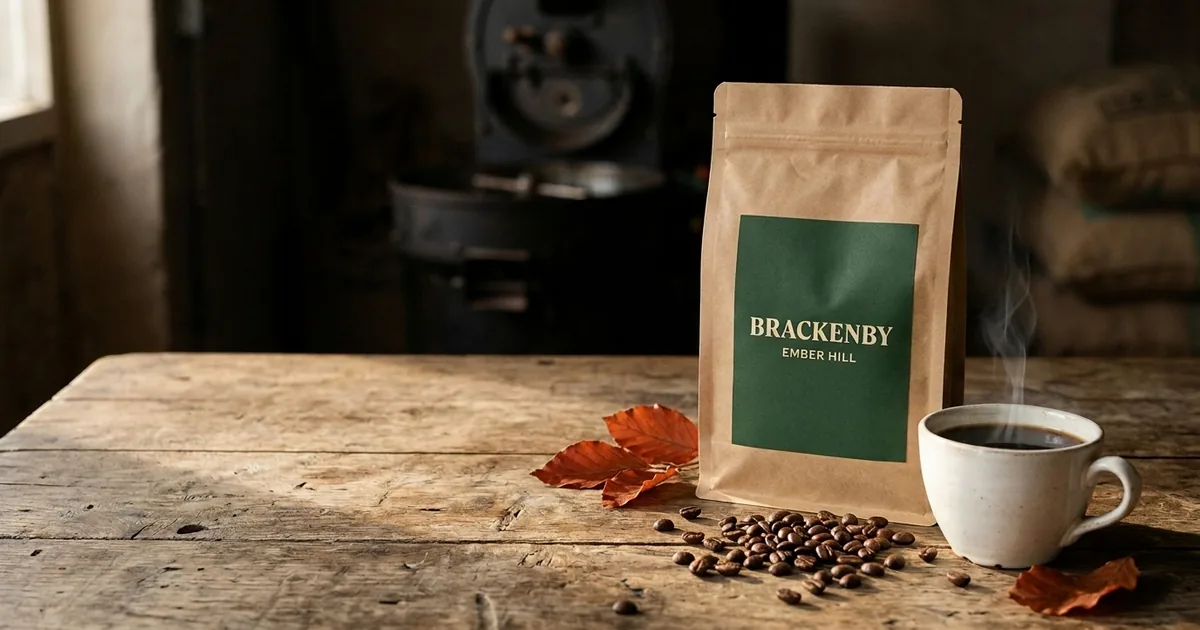
To use an AI generator well on a creative project, treat it like a junior production team, not a vending machine. Write a short brief, collect references, prompt for one specific shot at a time, generate a few options, keep the best, fix it in an edit pass, only then animate it, check the rights, and export each format for where it will run. The generators are good enough now that the hard part is no longer getting a nice picture. It is getting the right picture, with the right words on it, that you are allowed to use.
Most guides on this topic list tools and stop there. This one documents a real job. On 21 October 2026 we built a small launch kit for a fictional UK coffee roaster: a hero image, two social formats, a six-second animated clip, a voiceover and a music bed. Below are the exact prompts, what went wrong (a misspelled label, steam coming from the wrong place, a voiceover too long for the clip), how we fixed each problem, and what it all cost in credits.
All prices, plan details and terms below were checked 21 October 2026.
The workflow in eight steps
- Brief. One paragraph: the product, the audience, the channel, the formats you need and what must never appear. Write down what a rejected output looks like before you generate anything.
- References. Gather two or three images that show the light, colour and framing you want. Your own product photos beat anything you can describe in words.
- Prompt. Describe one shot: subject, setting, light, lens, composition, palette, and a short list of exclusions. Put any words you need on the product in quotation marks and keep them short.
- Generate and select. Make a small batch, pick one winner against the brief, and write down why the others failed. That note becomes your next prompt.
- Edit. Fix faults with targeted edit prompts or a normal image editor. Add headlines and prices yourself in a design tool rather than asking the generator to typeset them.
- Animate. Turn the approved still into motion with an image-to-video model. Ask for very little movement. Every extra instruction is another chance for the model to warp something you care about.
- Check rights and claims. Read the tool’s terms for ownership and commercial use on your plan, and check the finished asset against the advertising rules like any other ad.
- Export. Size and compress each format for its channel, check text legibility on a phone, and archive the prompts, settings and source files with the final assets.
The worked example follows those steps in order.
Worked example: a launch kit for Brackenby Coffee Roasters
Brackenby is invented. A web search found no roaster trading under the name, and the kit uses no real logos or people. The job:
| Brief item | What we specified |
|---|---|
| Product | Ember Hill, an autumn roast from a small Yorkshire roaster |
| Assets | One 16:9 hero image, one 4:5 feed post, one 9:16 story, one 5 to 10 second clip, a voice line and a music bed |
| Look | Kraft paper bag, deep green label, oak table, low morning window light, forest green and copper palette |
| Never | People, hands, invented claims, extra text, any logo other than our label |
| Budget | Under 450 Higgsfield credits and a small number of Runway credits |
We used Higgsfield for images and the main clip, and Runway for comparison clips from four other video models, the voiceover and the music. Both were driven through their official connectors from Claude, so every prompt and setting below is exactly what the tools received.
Step 1: a vague prompt versus a structured one
We started with the kind of prompt most people type first, using Google’s Nano Banana 2.1 model on Higgsfield at its default 1K resolution:
A nice advert image for a coffee brand called Brackenby launching a new autumn coffee The vague prompt. Attractive, and almost entirely unusable.
It looks like an advert, which is the problem. The model invented a headline, a strapline and the line “Available now at Brackenby Cafes & Online”. That is a factual claim about cafes that do not exist. It also added cinnamon and star anise, which suggests a flavoured coffee, and maple leaves, which read as North American. If a real business published this, the copy would be the generator’s, not yours, and some of it would be untrue.
Then the structured version, same model and settings:
Photorealistic product photograph for a small independent Yorkshire coffee
roaster's autumn launch. Subject: a matte kraft-paper coffee bag with a simple
deep green label printed with the words "BRACKENBY" in bold serif capitals and
"EMBER HILL" underneath in smaller letters, nothing else written on it. The bag
stands on a weathered oak table beside a white ceramic cup of black coffee with
a thin wisp of steam, a small scatter of roasted beans and two fallen copper
beech leaves. Setting: a rustic roastery with a softly blurred cast-iron drum
roaster in the background. Lighting: low warm morning window light from the
left, gentle shadows. Camera: 50mm lens, eye level, shallow depth of field,
focus on the bag label. Composition: bag and cup in the right two-thirds of the
frame, calm empty space on the left for headline text. Colour palette: forest
green, warm copper, cream, dark roast brown. Natural, honest, uncluttered. No
people, no hands, no extra text, no logos other than the label described.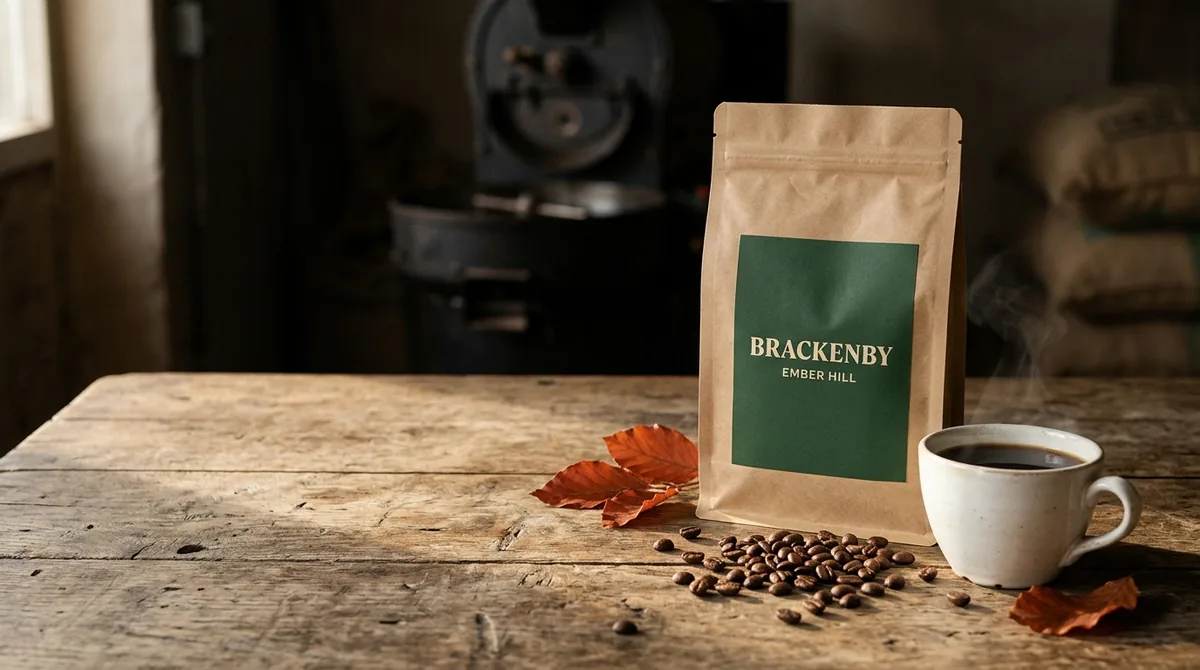 The structured prompt, first attempt. Label text perfect; steam in the wrong place.
This was close to usable on the first try. Both words on the label rendered correctly, the light came from the left as asked, and the left of the frame stayed clear for a headline. Two faults: the steam rises from behind the cup rather than from the coffee, and there are three leaves rather than two. The sacks in the background carry blurred, unreadable print, which is fine at this depth of field but would not be if they were in focus.
Each image cost 1.5 credits. The useful lesson is not that long prompts are better. It is that every sentence in the second prompt closes a door the first prompt left open. If you want a structure for prompts like this across a team, our guide to building a prompt library covers how to keep them reusable.
Step 2: social formats from a reference image
For the 4:5 feed post and 9:16 story we passed the hero image back in as a reference rather than describing the bag again. That is the single biggest consistency trick available: the model copies a picture far more faithfully than it follows a description.
Use the reference image as the product and style reference. Recreate the same
kraft-paper coffee bag with the identical deep green label reading "BRACKENBY"
and "EMBER HILL", same weathered oak table, same warm low morning light and
colour palette. New composition for a 4:5 Instagram feed post: overhead
three-quarter angle looking down at the table, the bag standing upright on the
left, a white ceramic cup of black coffee on the right with a thin wisp of
steam rising directly from the coffee surface, roasted beans and two copper
beech leaves scattered between them. Leave clear empty table space across the
top fifth for a caption. No people, no hands, no extra text anywhere.
The label carried across exactly and the top of the frame stayed empty. The light now falls from the right rather than the left, so the feed post and hero do not quite match; nobody scrolling will notice, but a picky art director would. We then added the headline ourselves in an editor. Generators can render short words, as the label shows, but your headline is copy that needs approving, and setting it in your own type means you can change it in seconds.
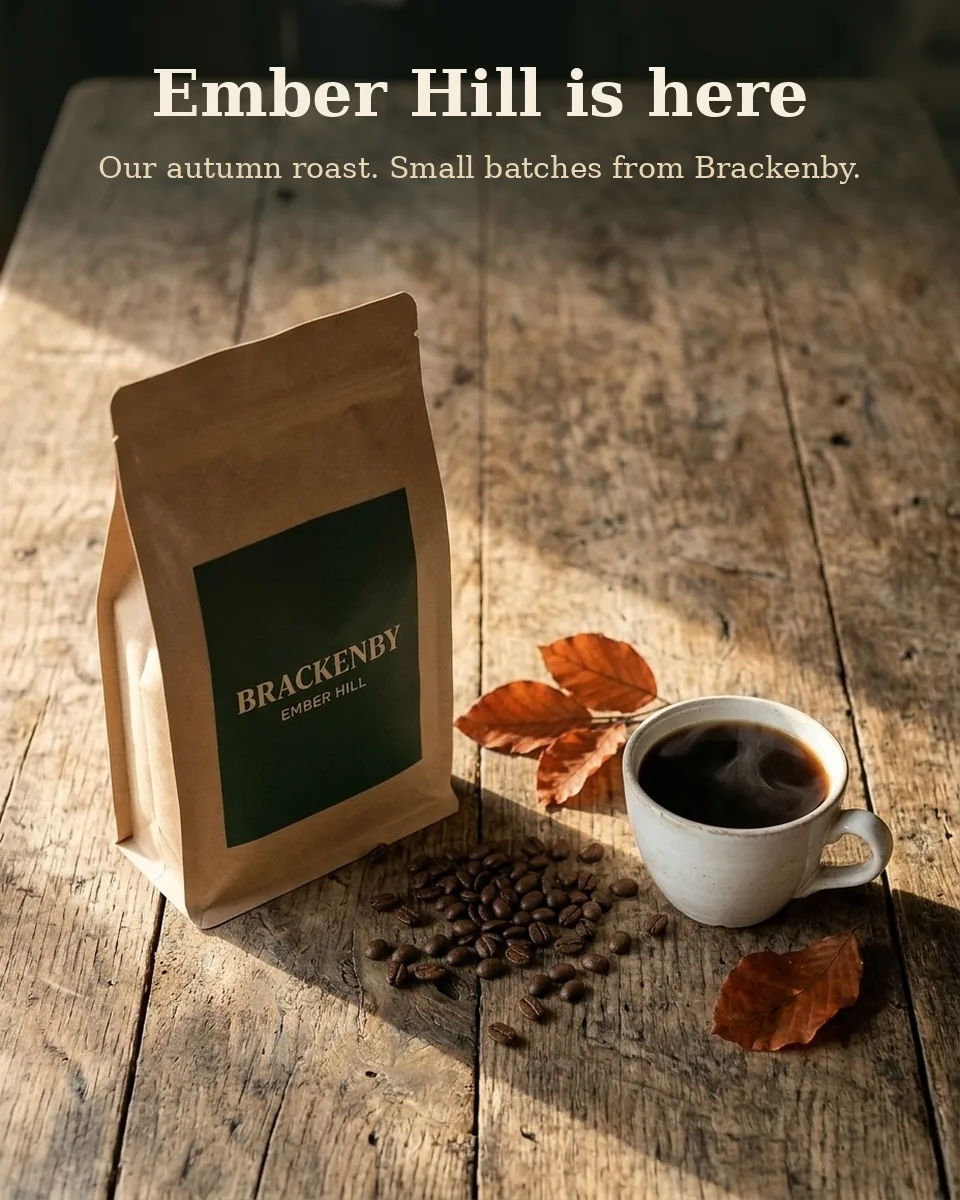 The 4:5 feed post. Image generated; headline and strapline added in an editor afterwards.
The 9:16 story took two attempts. The first ignored most of the composition instructions, kept the bag small and cropped the cup’s handle off the right edge of the frame. Rather than adding more adjectives, the retry was shorter and more physical: where the camera is, how much of the frame the bag fills, and an explicit instruction that the cup must sit fully inside the frame with its handle visible.
Vertical 9:16 photo. Same kraft coffee bag with the same deep green
"BRACKENBY / EMBER HILL" label as the reference, same oak table, same warm
window light from the left. Camera is close to the table at bag height, so the
bag is large and centred, filling about half the frame height. The white cup of
black coffee sits in front of the bag, slightly to the right, fully inside the
frame with its handle visible and nothing cut off at the edges. Plain dark
softly blurred background above the bag. No people, no hands, no extra text.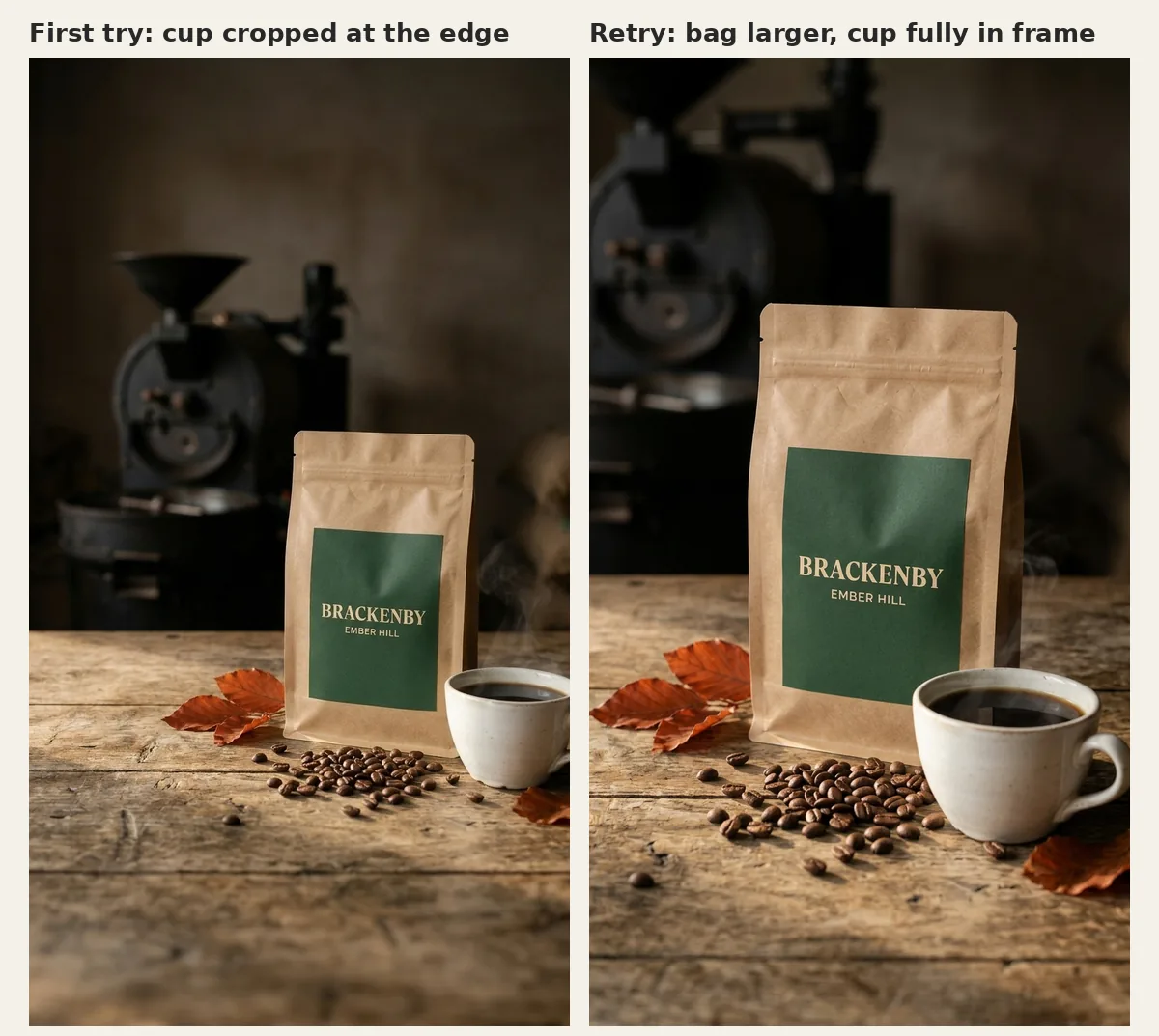 Story format: first try on the left, retry on the right.
Step 3: fix the still before you animate it
Image-to-video models treat your still as the truth. If the steam comes from behind the cup in the still, it will come from behind the cup in the video. So before animating we ran one edit prompt on the hero, again with Nano Banana 2.1 and the original image as the reference:
Edit this exact photo. Keep everything identical: composition, bag, label text,
cup, beans, leaves, lighting, background. Make one change only: remove the
steam that drifts up behind the cup on the right, and instead add a thin,
delicate wisp of steam rising straight up from the surface of the coffee inside
the cup.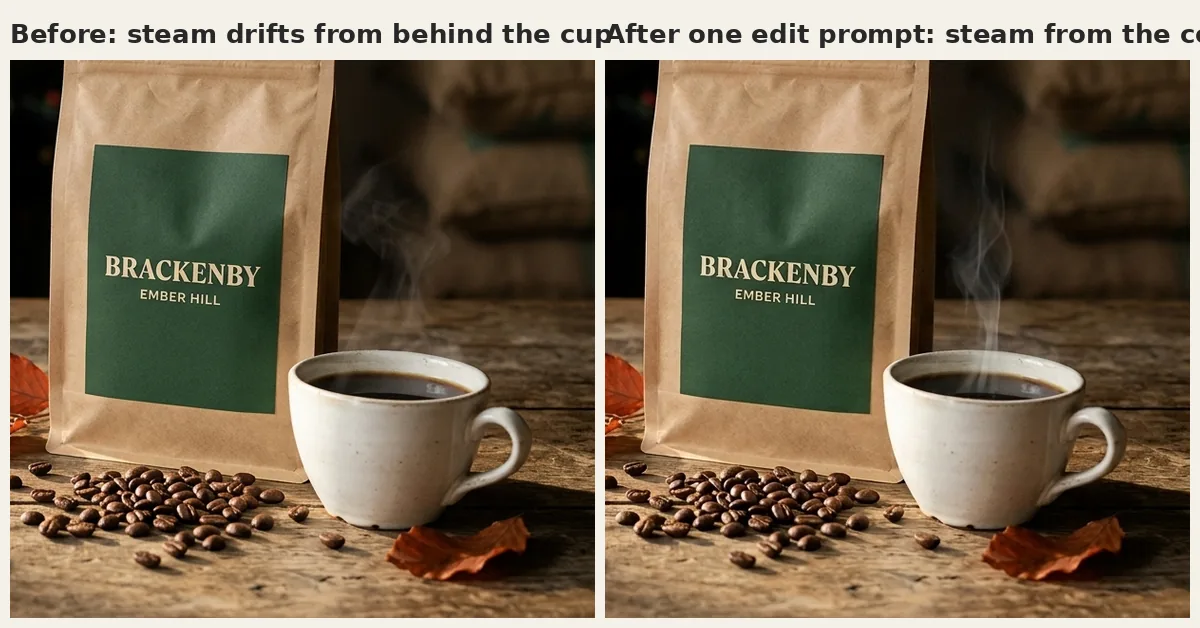 One targeted edit, 1.5 credits. Everything else in the frame stayed put.
“Keep everything identical” plus “one change only” is the pattern that works for edits. Ask for two changes at once and you are more likely to get a third you did not ask for.
Step 4: animate, inspect, fix
This is where the free plan showed its limits. Higgsfield’s suggested video models for this job (Kling 3.0, Seedance 2.5 and Grok Video 1.5) need a paid Higgsfield plan: on our free account they returned “requires basic plan or higher” or “requires plus plan or higher”, and so did GPT Image 2.5 for stills earlier. That is a plan tier, not a credit balance, so topping up would not have helped. MiniMax Hailuo 2.3 was available, at 6 credits for a six-second clip, so we used that for the main clip, and later ran Kling 3.0, Seedance 2.0 and Grok Imagine 1.5 on Runway instead to see what the paid models would have done.
We made three passes and checked every one by pulling frames out with ffmpeg and looking at them at full size, because a clip that looks fine at thumbnail size can still misspell your product.
- Pass 1 (original still, slow push-in). The label held, but the push-in was far stronger than the “about 10 percent” we asked for, and the steam still rose from behind the cup because the still had not been fixed yet.
- Pass 2 (corrected still, “very slight” push-in). The steam was right. But from the first second, the small line on the label read “EMSER HILL”. The big word survived; the small one did not.
- Pass 3 (corrected still, “completely static camera”). The model still drifted forward slightly, so “static” was not obeyed either. The label stayed close to correct, but at full size the B in EMBER softened into something between a B and an 8 in several frames.
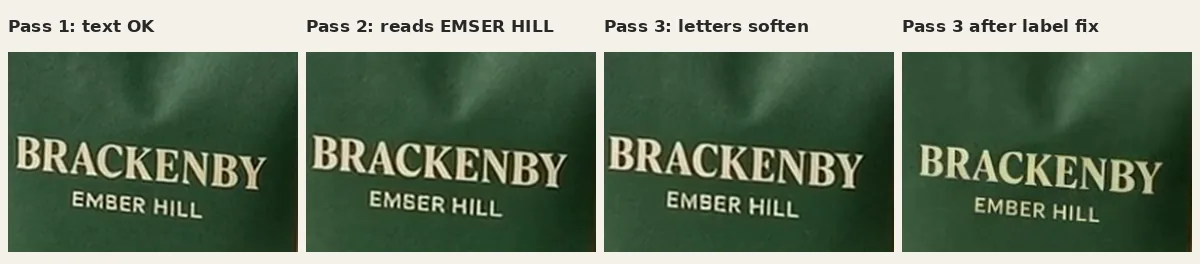 Small text is the first thing an image-to-video model damages. Check it frame by frame.
Rather than gamble more credits on a fourth pass, we fixed pass 3 in post. We tracked the bag through every frame and laid the clean label from the corrected still back over it, matched to the frame’s brightness, with feathered edges so there is no visible seam. In a desktop editor this is a planar tracking job; we scripted it with OpenCV because we were already working in code. It cost no credits.
For comparison we animated the original, uncorrected hero in Runway with Gen-4 Turbo, same prompt, five seconds at 1280 by 720. Runway’s push-in was gentler and closer to what we asked for, and the label held. The steam was heavier and drifted up from behind the cup towards the background, which is exactly the fault we had not yet fixed in the still. Our balance fell by 25 credits after the job.
Same still, four video models
To see what the models our free plan blocked would have done, we ran Kling 3.0, Seedance 2.0 and Grok Imagine 1.5 on Runway from the same corrected hero still, each for five seconds at 720p with the same prompt:
Completely static camera, locked off. Thin wisps of steam rise gently from the
coffee in the cup and drift upwards. Soft morning light flickers very slightly.
Nothing else moves. The coffee bag and its label stay perfectly still and
unchanged.
We checked each clip the same way as the Hailuo passes: two frames a second, label cropped and enlarged, cup and steam inspected at full size.
| Model | Platform | Credits | Camera stayed still? | Steam | Label held? |
|---|---|---|---|---|---|
| MiniMax Hailuo 2.3 (pass 3) | Higgsfield | 6 | No, slight forward drift | Rises from the coffee | Softened (the B in EMBER blurred); fixed in post |
| Kling 3.0 Standard | Runway | 45 | No, drifted sideways by about 5 percent of the frame width | Faint, and drifts sideways across the front of the bag | Mostly; the B in EMBER softened in several frames |
| Seedance 2.0 | Runway | 150 | Yes | Clear wisps rising from the coffee | Yes, sharp in every frame we checked |
| Grok Imagine 1.5 | Runway | 81 | Yes | Rises from the back rim of the cup rather than the centre | Yes, in every frame we checked |
Credits for the Runway clips are the balance drop after each job. Grok Imagine 1.5 always generates a soundtrack on Runway; we removed it and have not judged it.
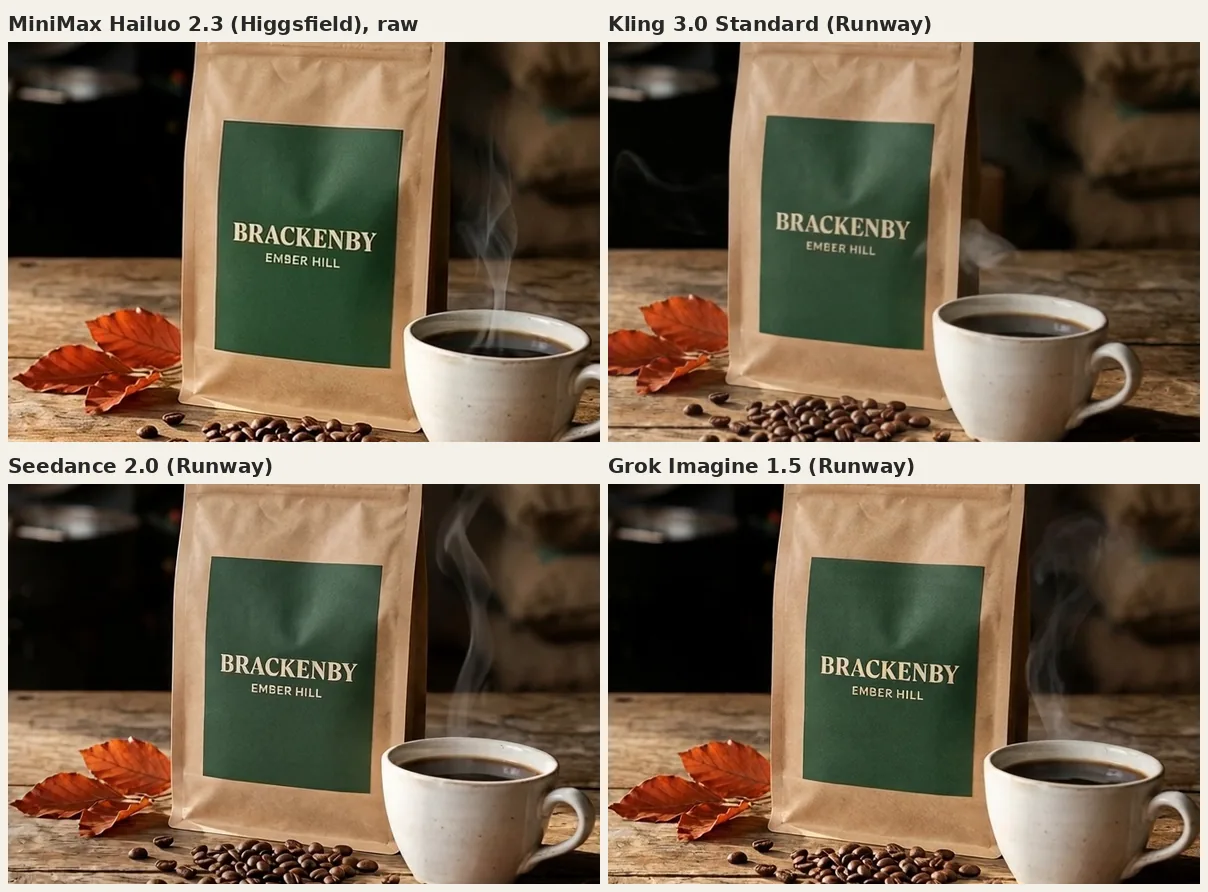 The same still, the same moment (four seconds in), four models. Hailuo is shown before our label fix.
Seedance 2.0 was the only clip we would have used without any repair. It obeyed “static”, kept the label crisp and put the steam where we asked. It also cost 150 Runway credits. Credits are not comparable across platforms, so convert at list prices: about $3.60 at Runway’s Standard rate, against about €0.30 for a 6-credit Hailuo pass at Higgsfield’s Plus rate. On the same basis Grok Imagine 1.5 was about $1.94 and a close second; Kling 3.0 Standard was about $1.08, the cheapest of the three and the least obedient.
The lesson is not that the dearest model wins. A cheap model plus a fix you know how to make can beat paying several times as much per attempt, as long as someone checks every frame. If nobody on the team can do the fix, pay for the model that does not need it.
Only Seedance 2.0 and Grok Imagine 1.5 held a static camera when asked, and no model followed a numeric instruction like “10 percent” precisely. Describe the feeling you want (“barely moving”, “a slow drift”) and then pick the take that matches.
Step 5: voice and music
We generated both in Runway. The voice used the Eleven Multilingual v2 model with the British preset voice “Miriam”. The first script was:
Ember Hill. Brackenby's new autumn roast. Small batches, roasted slow.Measured with ffmpeg, that came back as 7.3 seconds of speech for a clip that runs 5.9 seconds. A useful rule of thumb is about two and a half spoken words per second for a calm read, so a six-second clip has room for roughly a dozen words with breathing space at each end. We cut the line to “Ember Hill. Brackenby’s autumn roast.” and the new take ran 3.2 seconds of speech, which we placed 1.3 seconds into the clip.
The music came from Runway’s short-clip music model with this prompt:
Warm, gentle acoustic instrumental bed for a short autumn coffee advert.
Fingerpicked acoustic guitar, soft upright bass, light brushed percussion,
around 85 BPM, cosy and unhurried, calm resolution at the end. Instrumental,
no vocals.
It returned a 30-second track, far louder than the voice (about -12 LUFS against -28 LUFS integrated). Generated audio rarely arrives at broadcast-friendly levels, so plan a mix step: we trimmed the music to the clip length, lowered it by 13 dB, faded it in and out, raised the voice by 9 dB and exported the mix at about -19 LUFS. Whatever the meters say, listen to the final mix on headphones and on a phone speaker before it goes anywhere.
What we would do differently
- Keep small text off anything that moves, or make it bigger. The large word survived every pass; the small one failed in two of three.
- Fix stills before animating. The steam fault in the original still turned up in every clip made from it.
- Write the voice script to the clip length first, then generate.
- Add headlines, prices and calls to action in your own editor, never in the generator.
What it cost: the real numbers
| Asset | Tool and model | Attempts | Credits spent |
|---|---|---|---|
| Hero image (16:9) | Higgsfield, Nano Banana 2.1, 1K | 1 vague test, 1 structured, 1 edit | 4.5 |
| Feed post (4:5) | Higgsfield, Nano Banana 2.1, 1K, hero as reference | 1 | 1.5 |
| Story (9:16) | Higgsfield, Nano Banana 2.1, 1K, hero as reference | 2 | 3 |
| Six-second clip | Higgsfield, MiniMax Hailuo 2.3, 6 seconds | 3 | 18 |
| Comparison clip | Runway, Gen-4 Turbo, 5 seconds, 720p | 1 | 25 (balance drop after the job) |
| Model comparison clips | Runway: Kling 3.0 Standard, Seedance 2.0, Grok Imagine 1.5, 5 seconds, 720p | 3 | 45 + 150 + 81 = 276 |
| Voiceover | Runway, Eleven Multilingual v2, voice “Miriam” | 2 | Included in Runway total below |
| Music bed | Runway, short-clip music model | 1 | Included in Runway total below |
| Total | 27 Higgsfield credits, 316 Runway credits |
Our Runway balance went from 490 to 450 across the Gen-4 Turbo clip, two voice takes and one music track. The per-job balance readings shown after each request did not add up neatly to that total, so we report it from the account balance, which is the number that matters. The three model comparison clips were run later and are recorded from the balance drop after each one. Check your own ledger rather than trusting per-job estimates.
The Higgsfield work produced four usable visual assets (hero, feed post, story, clip) for 27 credits, an average of 6.75 credits per usable asset. The clip alone was 18 credits because two of its three passes were rejected. Images were cheap; motion was where the waste happened.
The alternative route for the clip makes the trade-off concrete. One Seedance 2.0 take on Runway was usable straight away for 150 credits, so its cost per usable clip was 150 Runway credits. Our Hailuo route cost 18 Higgsfield credits per usable clip, plus the label fix.
To turn credits into money, use the list prices below. At the €59 for 1,200 monthly credits shown for Higgsfield Plus in our eurozone account check, 27 credits works out at about €1.33. VAT treatment was not stated. At Runway’s Standard plan rate of $15 for 625 credits, the 316 Runway credits work out at about $7.58, of which the Seedance clip alone is about $3.60. That is arithmetic from list prices, not what we paid: we ran on a free Higgsfield account and an existing Runway allowance. The real cost is time. Our run took about 25 minutes from the first image request to the exported clip, most of it waiting for video renders and checking frames. Someone doing the review and the label fix by hand in an editor should expect longer, so budget for checking, not just generating.
Which tool for which job
This is not a ranking. It is a starting shortlist by job, with what each free tier allowed and what paid plans cost when we checked on 21 October 2026. Prices change often, so confirm on the vendor’s page before you buy.
| Job | Tool | Free tier | Paid plans (as shown) |
|---|---|---|---|
| Images, plus access to many third-party image and video models | Higgsfield | Our free account ran Nano Banana 2.1 images and MiniMax Hailuo video; newer models such as GPT Image 2.5, Kling 3.0, Seedance 2.5 and Grok Video 1.5 needed a paid plan | Starter €19 a month (270 credits); Plus €59 a month or €47 a month billed annually (1,200 credits); Ultra €129 a month or €99 a month billed annually (3,000 credits). Shown in EUR in our 21 October account check; VAT treatment not stated. Confirm your own checkout |
| Images and short video inside an Adobe workflow | Adobe Firefly | Free daily generations that refresh each day | Standard £9.98 a month (2,000 credits); Pro £19.99 a month (4,000 credits); higher tiers available. GBP including VAT |
| Video generation and editing | Runway | 125 one-time credits and a selection of models | Standard $15 a month or $12 billed annually (625 credits); Pro $35 or $28 annually (2,250 credits); Max $95 or $76 annually (9,500 credits). USD |
| Voiceover | ElevenLabs | 10,000 credits a month, no commercial licence | Starter $6 a month with commercial licence; Creator $22 a month (first month half price when we checked). USD |
| Music | Suno | 50 credits a day, no song downloads and no commercial rights | Pro shown at $8 a month and Premier at $24 a month, with a note that yearly billing saves $24 and $72 a year respectively. USD |
A few practical notes from the test:
- Model hubs versus single vendors. Higgsfield and Runway both give you several companies’ models under one account. That is useful for comparing, but the model you can actually run depends on your plan, and the error messages are not always clear about which plan you need.
- Adobe’s position on commercial safety. Adobe’s plans page says outputs from its own Firefly models are safe for commercial use, and that you are responsible for checking content from partner models. If indemnity matters to you, read which models that statement covers.
- Voice and music are where free plans bite. ElevenLabs’ free tier and Suno’s free tier both exclude commercial use. Anything for a client or a paid campaign needs a paid plan from the start.
For a broader look at one of the image and video tools not covered here, see our Dreamina AI guide.
Who owns the output: commercial use and UK copyright
There are three separate questions, and people often blur them.
1. What does the tool’s contract let you do? This is set by each vendor’s terms, and it varies by plan.
- Higgsfield (terms last updated 26 July 2026) says it “does not claim ownership of any of your Inputs or Outputs, nor does it restrict your commercial use of Outputs”, and that you may pass those rights to clients. It also says outputs may not be unique and that you are responsible for rights clearance, and it may use your inputs and outputs to train its models unless you are on an enterprise agreement.
- Runway (terms last updated 15 September 2026) says it does not claim ownership of your outputs and “does not restrict your commercial use of your Outputs”, subject to the terms. It too may use inputs and outputs to train its models, and similar outputs may be generated for other users.
- ElevenLabs (terms last updated 9 October 2026) says you retain your rights in your output, but free users may use the services for non-commercial purposes only. Commercial use needs a paid plan.
- Suno’s pricing page lists “No commercial rights” on the free plan and commercial use rights on Pro and Premier.
2. Is there copyright in the output under UK law? The UK is unusual. Section 9(3) of the Copyright, Designs and Patents Act 1988 says that for a computer-generated work, “the author shall be taken to be the person by whom the arrangements necessary for the creation of the work are undertaken”. Whether that applies to a given AI output, and who made the necessary arrangements, has not been settled by the courts for modern generative tools. In its Report on Copyright and Artificial Intelligence, published in March 2026, the government proposed removing this protection for wholly computer-generated works while continuing to protect works created with AI assistance. That is a proposal, not a change in the law, and no timetable was set. The practical reading: the more genuine human creative input in the final asset (your composition, your edit, your copy, your selection and arrangement), the stronger your position. Do not assume a raw generation is protected, and do not assume competitors cannot produce something similar.
3. Does the ad follow the advertising rules? The ASA has been clear that “the same rules apply in the same way, regardless of whether AI is used or not”, and that “there is no blanket legal requirement in the UK to disclose the use of AI in ads” (ASA, May 2025). What matters is whether the ad misleads. An AI image that exaggerates what a product does is a problem, and the ASA notes that a disclosure “is very unlikely to mitigate the harm caused by a fundamentally misleading message”. Our vague-prompt image, with its invented claim about cafes, is exactly the kind of thing that slips through when nobody reads the generated copy. The government’s report also confirms there is currently no UK obligation to label AI-generated content, though it intends to work with industry on best practice.
None of this is legal advice. For anything high-value, such as a brand identity or a national campaign, ask an IP solicitor. If you are writing internal rules for how your team uses these tools, our AI policy template for UK businesses covers the clauses that matter.
A prompt template you can copy
This is the structure behind every prompt that worked in our test. Fill in the brackets and delete any line you do not need.
[Photo style], [aspect ratio] image for [brand type and audience].
Subject: [the product, described physically]. Any text on it reads exactly
"[SHORT WORD]" and "[SHORT WORD]", nothing else written on it.
Setting: [place, surface, background, how blurred].
Lighting: [time of day, direction, quality].
Camera: [lens, height, angle, depth of field, where the focus sits].
Composition: [where the subject sits, where to leave empty space and why].
Colour palette: [three or four colours].
Mood: [two or three plain words].
Exclusions: no people, no hands, no extra text, no logos other than [yours].
For edits, use this instead:
Edit this exact image. Keep everything identical: [list the things that matter].
Make one change only: [the change, described physically].
For image-to-video, keep it short:
[Camera behaviour in plain words, e.g. barely moving]. Only [the one or two
things that should move] move. [Product] and its label stay still and unchanged.
No people, no hands, no new objects.
Checklist before you publish
- Every word on the asset is spelled correctly, checked at full size and frame by frame for video.
- No claims, prices, offers or locations appear that you did not write and cannot prove.
- No real people, celebrities, logos or trademarks have crept in, including in blurred backgrounds.
- The tool’s terms allow commercial use on the plan you generated on, and you have saved a copy of those terms with the date.
- Voice and music were generated on a plan that permits commercial use, and you have listened to both all the way through.
- Headline and copy were approved like any other ad copy, and the ad would pass the CAP Code if the image were a photograph.
- Each format is sized for its channel, and text is legible on a phone screen.
- Prompts, model names, settings, seeds where available and source files are archived with the final assets.
- Images are compressed (we used WebP under 150 KB) and video is H.264 at 720p, which kept our six-second clip under 600 KB with audio.
Frequently asked questions
Can I use AI-generated images commercially in the UK?
Usually yes, if the tool’s terms allow it on your plan and the image does not infringe anyone else’s rights or mislead customers. Higgsfield and Runway both say they do not restrict commercial use of outputs. ElevenLabs and Suno restrict commercial use on their free plans. Read the terms for your plan, not the marketing page.
Who owns AI-generated content in the UK?
Between you and the vendor, the major tools say they do not claim ownership of your outputs. Whether copyright exists in a purely AI-generated work is less certain: section 9(3) of the CDPA gives authorship of computer-generated works to the person who made the necessary arrangements, but the government proposed in March 2026 to remove that protection for wholly computer-generated works. Human creative input in the final asset strengthens your position.
Do I have to label AI-generated adverts in the UK?
There is no blanket legal requirement, according to both the ASA and the government’s 2026 report. The test is whether the ad misleads. If AI imagery could make people believe something untrue about the product, a label will not fix it.
Why does AI keep misspelling text on my product?
Image models now handle short words well, as our label showed, but video models redraw every frame and small text degrades first. Keep text large and short, avoid moving it, check frames at full size, and add important text in an editor.
How much does it cost to make an AI campaign asset?
In our test, a full set of four visual assets cost 27 Higgsfield credits, which is about €1.33 at the Plus plan rate shown in our eurozone account check. On Runway, 40 credits covered a comparison clip, voice and music, and three more model comparison clips used 276 credits, of which the best (Seedance 2.0) was 150 on its own. The bigger cost is review and fixing time, which is why a vague prompt that produces unusable copy is never really cheap.
Can I use a free plan for client work?
Check each tool. On the tools we checked, free plans either limited which models you can use (Higgsfield, Runway) or excluded commercial use entirely (ElevenLabs, Suno). For client work, budget for a paid plan.
Where to go from here
The tools are now cheap enough that the cost of a campaign asset is mostly the time spent briefing, checking and fixing. That is a skill a team can learn. If you want your marketing team trained on a workflow like this one, with your own brand and products, that is what our AI training for UK teams covers. If you need help choosing tools, plans and policies across the business, see our AI consultancy. And if the bottleneck is the process around the tools (briefs, approvals, asset handover), our marketing workflow consulting is built for exactly that.
Jon Goodey
Founder & CEO
Jon is the founder of Indexify, helping UK businesses leverage AI and data-driven strategies for marketing success. With expertise in SEO, digital PR, and AI automation, he's passionate about sharing insights that drive real results.
Related Resources
Continue Reading
- More Articles - Latest marketing insights
- Learning Hub - Free educational tracks
- Case Studies - Real client results
How Indexify can help
- AI marketing consultancy - prioritise useful AI work across marketing and growth
- AI implementation consultancy - build, test and hand over a working process
- AI consultancy - choose and embed useful AI workflows
- AI training for teams - practical sessions built around your work
Ready to Put These Insights Into Action?
Explore our services or get in touch to discuss your marketing goals.