The Best Free AI Image Generators in 2026, Tested for UK Businesses
We ran the same three business prompts through eight image models today and checked every free tier against the vendor's own pricing page. Here is which free AI image generator to use for which job, and where the free plans quietly stop being free.
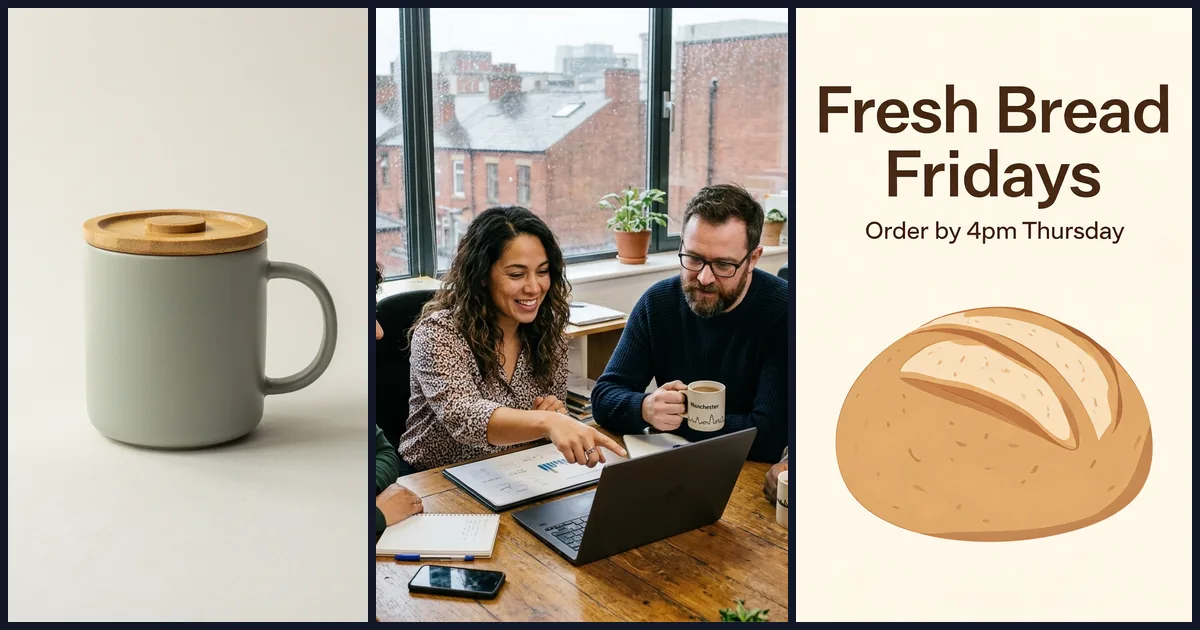
Most “best free AI image generator” lists were written a year ago and copied forward. The tools have changed underneath them. Models have been replaced, free allowances have been cut or reworded into vague “credits”, and text inside images, which used to be the giveaway of an AI picture, is now mostly solved.
So we did two things on 21 October 2026. We checked every tool’s free tier and cheapest paid plan against the vendor’s own pricing page, and we ran the same three ordinary business prompts through eight image models to see what you actually get. Every image below was generated for this article, and every prompt and setting is printed so you can repeat the test.
The short answer
If you only read one section, read this one.
- For everyday marketing images with no budget: use the free tier of Google Gemini. It runs Nano Banana 2, which gave us one of the two most convincing office scenes and a clean product shot. Free downloads are 1K resolution.
- For the closest match to a detailed brief: OpenAI’s GPT Image 2.5 was the most faithful model in our test, which we ran through Runway. ChatGPT’s pricing page does not name the model it uses for free users, so do not assume the free ChatGPT tier gives identical results.
- For social graphics with words on them: Ideogram was built for text and still handles it well, but in our test every model spelled the copy correctly. Choose on layout and style, not spelling.
- For anything that must be commercially safe and brand-clean: Adobe Firefly. Adobe states that outputs from its own Firefly models are safe for commercial use, and it is explicit that partner models are your responsibility.
- If you already pay for Microsoft 365 or Canva: use the image tools you have. Microsoft Designer and Canva both include monthly AI allowances, and paid plans raise them.
- For confidential work: avoid free tiers that publish your images. Ideogram and Leonardo both make free-plan images public.
- Midjourney has no free plan. Its cheapest subscription is $10 a month.
How we tested
We wrote three prompts that a UK small business or marketing team might genuinely use:
- Product shot: a sage-green ceramic mug with a bamboo lid on a plain off-white background, lit from the left, with no text or logos.
- Team photo: four colleagues in a Manchester agency office around a laptop on a wooden table, one pointing, one holding a mug of tea, rain on the window and red-brick buildings outside, no logos or brand names.
- Social graphic: a square bakery post with the headline “Fresh Bread Fridays” and the line “Order by 4pm Thursday”, a cream background, a sourdough illustration and sans-serif type.
We ran each prompt once, with no cherry-picking or re-rolls, through four models on Higgsfield, a platform that hosts models from several companies: Google’s Nano Banana 2, ByteDance’s Seedream 5.0 Lite (the model family behind Dreamina), Black Forest Labs’ FLUX.2 Pro and Ideogram 4.5.
We also wanted OpenAI’s and Recraft’s models in the test, but Higgsfield’s free plan would not run them. GPT Image 2.5 and Recraft V4.1 both returned “Requires basic plan or higher”, which means a paid Higgsfield plan is needed, not just more credits. That is itself a useful finding: “free” on a multi-model platform often means “the cheaper models only”. So we ran the same prompts through Runway instead, using GPT Image 2.5 Flare, Recraft V4.1 Flash and xAI’s Grok Imagine Image 2. We also ran the social graphic through Runway’s own Gen-4 image model. Then we looked at every file at full resolution and noted what each model got right and wrong.
Two caveats matter. One generation per model is a snapshot, not a benchmark, so treat our verdicts as “what happened today” rather than a permanent ranking. And running a model through Higgsfield or Runway is not identical to using it inside the vendor’s own app, where extra prompt rewriting or safety layers may change the result.
Free AI image generators compared
All details below were checked on 21 October 2026 against each vendor’s pricing or help pages, linked in each tool’s section. Where a vendor does not publish a number, we say so rather than guess. Prices are shown in the currency the vendor displayed to us.
| Tool | Free allowance | Commercial use | Free-plan watermark or visibility | Cheapest paid plan | Best for |
|---|---|---|---|---|---|
| Google Gemini (Nano Banana 2) | Image generation included; compute-based limits that refresh every 5 hours up to a weekly cap. 1K downloads | Not stated on the pricing page; check Google’s terms | Not stated on the pages we checked | Google AI Plus, £4.49/month | Realistic everyday images |
| ChatGPT | ”Limited image creation” | OpenAI’s terms say you own the output | Not stated | Plus, $20/month (OpenAI help centre) | Iterating on an image in conversation |
| Microsoft Designer | Monthly credits, 1 credit per AI action (number not published) | Not stated on the Designer page | Not stated | Microsoft 365 Personal, £8.49/month or £84.99/year (up to 4x credits) | Teams already on Microsoft 365 |
| Adobe Firefly | Free daily generations (number not published) | Firefly model outputs stated as commercially safe; partner models your responsibility | Not stated | Firefly Standard, £9.98/month inc. VAT, 2,000 credits | Brand-safe commercial work |
| Canva | Up to 20 Standard or Premium AI uses, shared across AI tools | You own output, used “at your own risk”; not output that uses Canva library content | Not stated | Pro, £100/year | Designs that need layout, not just an image |
| Ideogram | 30 credits a week if you sign in with Google, Apple or Microsoft | Allowed; Ideogram does not claim ownership | Free images are public | Plus, $20/month or $15/month billed annually | Text-heavy graphics |
| Leonardo | 150 fast tokens a day | Allowed on the free plan | Free creations are public | Essential, $12/month | High-volume experiments |
| Krea | 100 compute units a day | FAQ lists a commercial licence on paid plans only | Not stated | Basic, from about $5/month billed annually | Trying many models in one place |
| Dreamina (CapCut) | “Free daily credits” (amount not published) | Depends on Dreamina’s terms, content and model | Paid plans remove the Dreamina watermark | Basic, $15/month | Seedream images and short video |
| Higgsfield | Free account; cheaper models only (GPT Image and Recraft need a paid plan) | Not stated on the pages we could read | Not stated | Starter, €19/month (eurozone price) | Comparing many top models side by side |
| Runway | 125 one-time credits that do not expire | Not stated on the pricing page | ”No watermarks” is listed as a Standard plan feature | Standard, $15/month or $12/month billed annually | Image-to-video workflows |
| Midjourney | No free plan | Allowed for subscribers; companies earning over $1M a year need Pro or Mega | Not applicable | Basic, $10/month or $96/year | Stylised, art-directed imagery |
The side-by-side test
Test 1: a product shot on a plain background
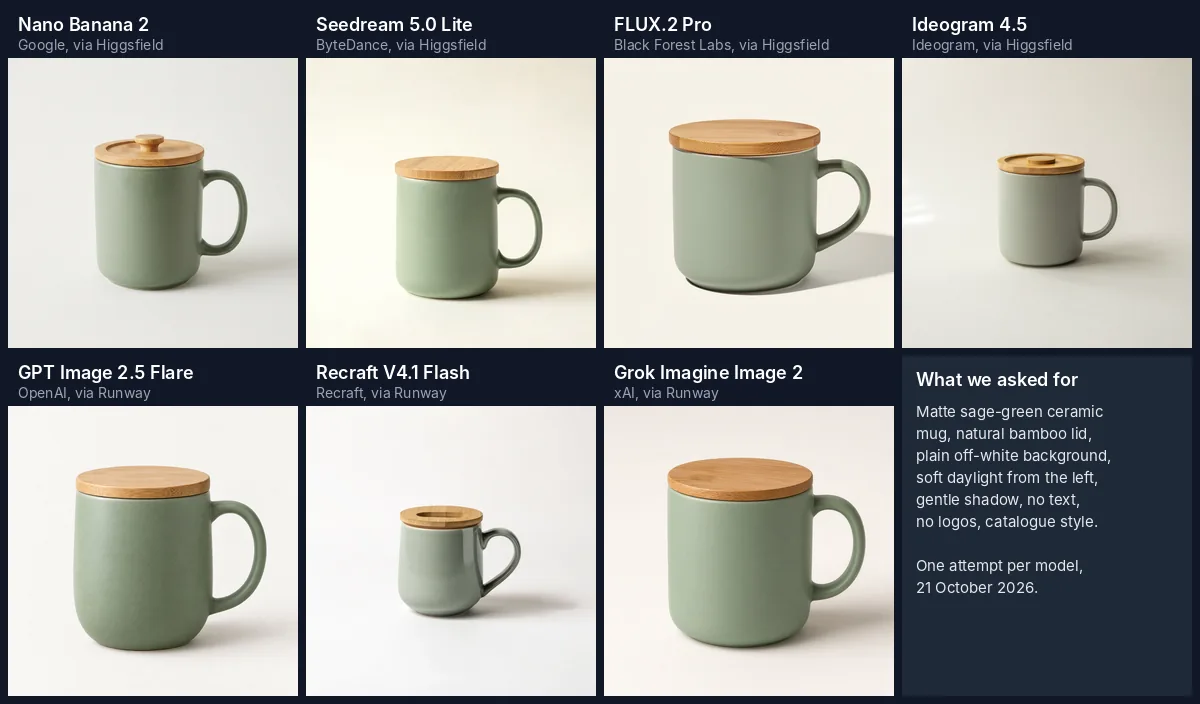
Same prompt, seven models, one attempt each. Generated by Indexify on 21 October 2026.
Prompt: “Studio product photograph of a matte sage-green ceramic coffee mug with a natural bamboo lid, centred on a plain off-white background, soft diffused daylight from the left, a gentle natural shadow, no text, no logos, e-commerce catalogue style.” Square (1:1).
All seven would pass a quick glance, which says a lot about where these tools are now. The differences are in the details a product manager would notice:
- GPT Image 2.5 Flare was the closest to the brief: a matte sage-green mug, a bamboo lid with visible strip grain, a plain background and no stray marks anywhere.
- Nano Banana 2 produced an equally finished catalogue image. The lid has a turned knob, the colour is a believable sage, and the shadow falls the right way for light from the left.
- Seedream 5.0 Lite gave the cleanest, flattest background and a 2048 by 2048 pixel file, the largest in the test. The lid is a simple disc with no knob, which the prompt did not ask for either way.
- Grok Imagine Image 2 got the matte green mug right, but the lid’s grain looks more like oak than bamboo.
- FLUX.2 Pro framed the mug largest, on a warmer cream background. At full size there is a faint stamped mark on the lid that looks like a maker’s mark. Nobody asked for it, and on a real product listing it could read as a brand.
- Ideogram 4.5 looked most like a real photograph, with a patch of window light on the left. But the mug drifted from sage green to a cool grey, which would be a problem if you were selling the green one.
- Recraft V4.1 Flash made the mug glossy rather than matte, and cut an odd oval slot into the lid. It is also the smallest in frame.
Verdict: for a mock-up or a concept, most of them. For a real product listing, none of them, because they are not your product. Use AI to generate backgrounds and scenes around a photo of the real item, and never to invent what a customer will receive.
Test 2: a UK office team
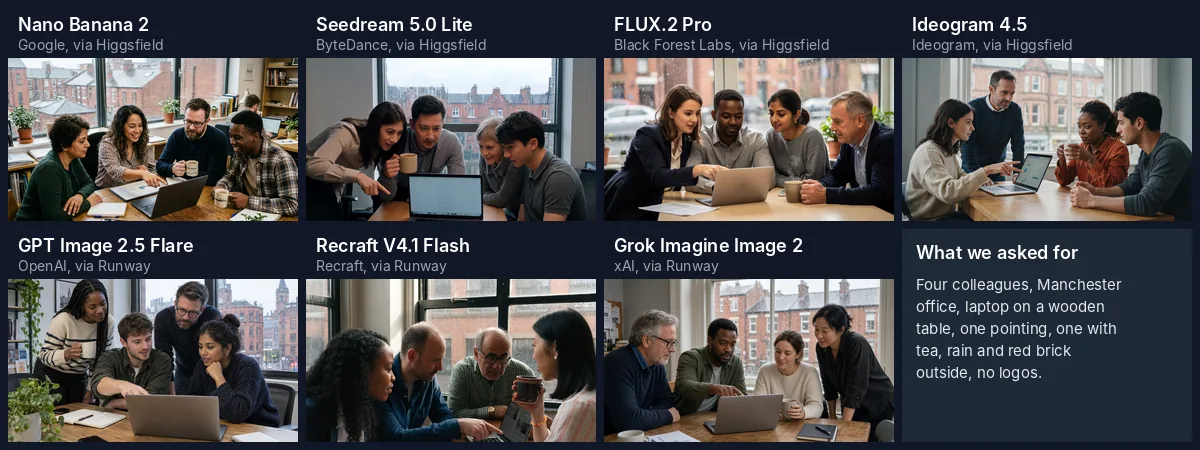
Cropped to the same shape for comparison. The logo on the FLUX.2 Pro laptop has been blurred by us; see below. Grok Imagine Image 2’s first attempt failed on Runway’s side and was refunded; the retry is shown.
Prompt: “Candid photograph of four colleagues in a small marketing agency office in Manchester, UK, gathered around a laptop on a wooden table. One person is pointing at the screen, another holds a mug of tea. Mixed ages and ethnicities, smart-casual clothes. Rain on the window behind them with red-brick buildings outside. Natural light, realistic hands and faces, no logos or brand names.” Nano Banana 2 at 3:2, the others at 16:9.
People are where image models used to fall apart, so we checked every hand at full resolution. None of the seven produced the extra fingers or melted hands that gave AI images away a couple of years ago. The problems were subtler.
- GPT Image 2.5 Flare matched the brief most closely: exactly four people, one pointing at the screen, one holding a mug, a wooden table, rain on the glass and red-brick buildings outside, including a Gothic-looking tower that feels plausibly Manchester. We found no logo on the laptop. A row of shop signs in the far background is blurred and unreadable, which is what you want.
- Grok Imagine Image 2 was just as faithful: four people, one pointing, one holding a mug, a worn wooden table, rain on the window and a row of red-brick terraces outside. The laptop lid is plain and the hands hold up at full size. It is the most “ordinary office” of the set, which is exactly what the prompt asked for.
- Nano Banana 2 came close behind: a properly wooden table, rain on the glass, red-brick terraces, bookshelves and plants. It did two things we did not ask for. It added a fifth person working in the background, and it printed the word “Manchester” and a city skyline on the mugs. Harmless here, but it shows the model adding text you did not request.
- Recraft V4.1 Flash gave a natural, documentary-style frame with four people, rain and brick outside. Hands are convincing. The tea is in a dark patterned cup rather than an ordinary mug, and at 1344 by 768 pixels the output was the smallest of the seven.
- Seedream 5.0 Lite produced the most cinematic frame, darker and moodier, with everyone leaning in over the laptop. Hands are convincing. It reads more like a film still than a stock photo, which may or may not suit your brand.
- Ideogram 4.5 gave a relaxed, stock-photo feel: wooden table, rain, a red-brick Victorian building. One of the four is standing rather than seated, but there is nothing we would need to fix.
- FLUX.2 Pro put a real computer company’s logo on the laptop lid, despite “no logos or brand names” in the prompt. It also drew a puff of steam floating in front of one woman’s jumper, nowhere near a mug, and the table came out as pale laminate rather than wood.

FLUX.2 Pro, full-resolution detail. We blurred the brand logo it added to the laptop. Note the stray steam in front of the grey jumper.
Verdict: this is the test that should change how you review AI images. The obvious failures have gone, so the risk now is a plausible image that quietly contains someone else’s trademark or an extra detail you did not approve. Zoom in before you publish.
Test 3: a social graphic with exact text
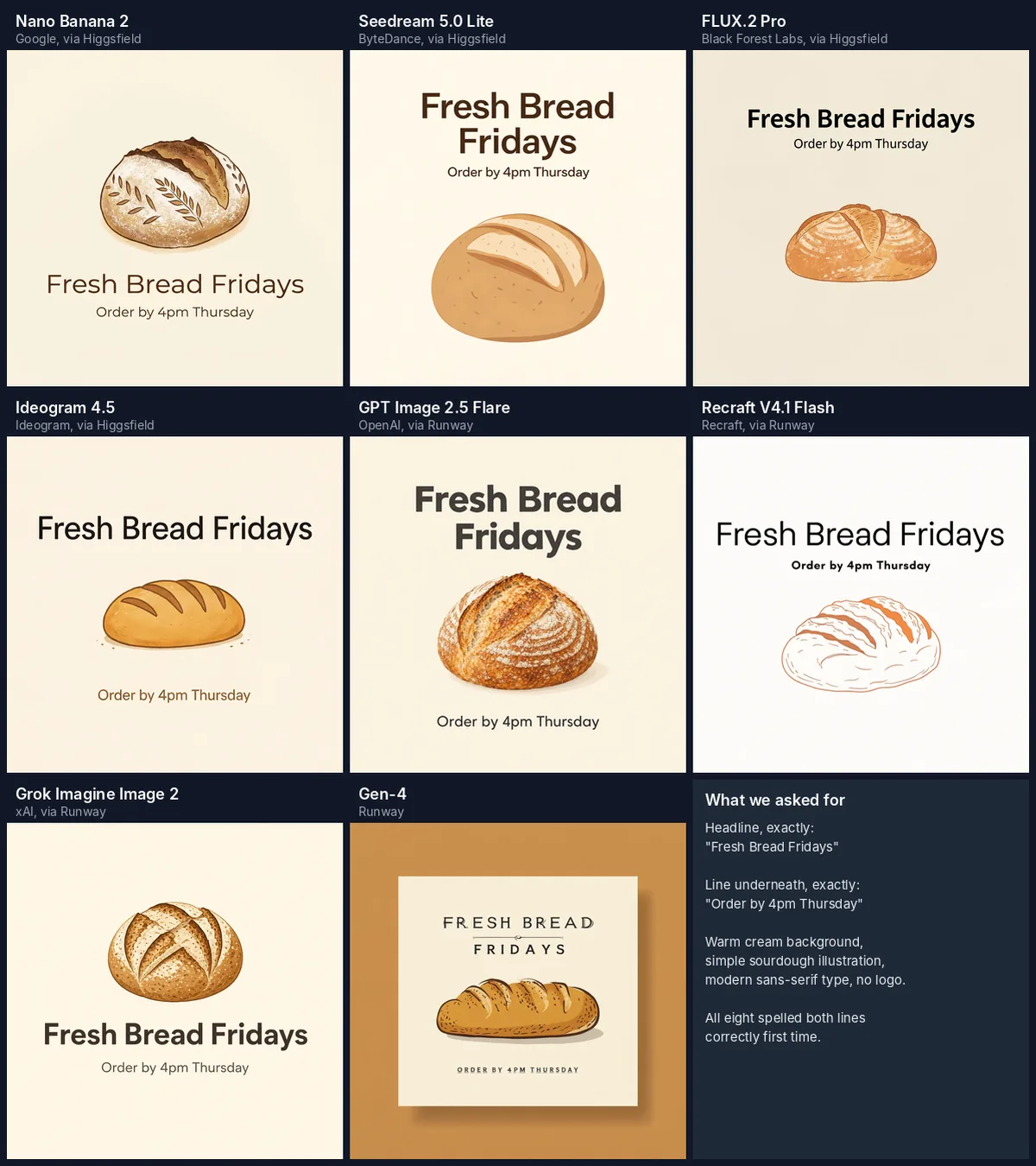
All eight spelled both lines correctly on the first attempt. Generated by Indexify on 21 October 2026.
Prompt: “Square social media graphic for a small UK bakery. Warm cream background with a simple illustration of a fresh sourdough loaf. Headline text, spelled exactly: “Fresh Bread Fridays”. Smaller line underneath, spelled exactly: “Order by 4pm Thursday”. Clean modern sans-serif typography, plenty of empty space, no logo.” Square (1:1).
A few years ago this was the test most generators failed. Today all eight models spelled both lines correctly on the first try. The differences were about following the design brief:
- Grok Imagine Image 2 followed the brief most faithfully: a warm cream background, an illustrated scored boule, a bold sans-serif headline and the smaller line directly beneath it.
- Nano Banana 2 drew the most appealing loaf, a floured boule with a wheat pattern, and set the text neatly beneath it.
- Seedream 5.0 Lite gave the strongest headline, bold and split over two lines, and the most usable layout for a feed.
- FLUX.2 Pro set a clean black headline with the subline directly below, exactly as written.
- GPT Image 2.5 Flare set a heavy, confident headline, but the loaf is photographic rather than “a simple illustration”, and it moved “Order by 4pm Thursday” to the bottom, below the bread, rather than under the headline.
- Ideogram 4.5 made the same move, placing the second line right at the bottom. Its loaf is closer to a bloomer than a sourdough.
- Recraft V4.1 Flash drew a tidy line-art loaf and kept the subline directly under the headline, but the background is close to white rather than warm cream, and it set the smaller line in bold and the headline in a light weight, the reverse of what most designers would do.
- Runway Gen-4 rendered a mock-up: a printed card on an orange backdrop rather than the graphic itself. It used decorative capitals instead of the sans-serif we asked for, some letter strokes are uneven at full size, and the bread is a long loaf rather than sourdough.
Verdict: text rendering is no longer the deciding factor. But for anything with a price, date or offer in it, you should still type the words yourself in Canva, Designer or similar on top of an AI background. That way a typo can never reach print, and you can edit the date next week without generating a new image.
Exact settings and cost
| Model | Platform | Settings | Credits per image on our account |
|---|---|---|---|
| Nano Banana 2 (Google) | Higgsfield | 1K resolution | 1.5 Higgsfield credits |
| Seedream 5.0 Lite (ByteDance) | Higgsfield | Default (basic quality) | 1 Higgsfield credit |
| FLUX.2 Pro (Black Forest Labs) | Higgsfield | Pro variant, 1K | 1 Higgsfield credit |
| Ideogram 4.5 | Higgsfield | 1K, medium quality, magic prompt off | 2 Higgsfield credits |
| GPT Image 2.5 Flare (OpenAI) | Runway | Default (1920 pixel output) | 16 Runway credits |
| Recraft V4.1 Flash | Runway | Default (1K output) | 1 Runway credit |
| Grok Imagine Image 2 (xAI) | Runway | 1K (office prompt retried once after a failed, refunded attempt) | 6 Runway credits |
| Gen-4 (Runway) | Runway | 1080 by 1080 | Not itemised by the tool |
GPT Image 2.5 and Recraft V4.1 were also available on Higgsfield, but only on a paid plan, so we used Runway for them. The Higgsfield part of the test, 12 images across four models, cost 16.5 credits. On Runway, GPT Image 2.5 was by far the most expensive of the three extra models: 16 credits an image, against 6 for Grok Imagine Image 2 and 1 for Recraft V4.1 Flash. One run per prompt, no re-rolls, no editing apart from cropping to a common shape for the grids and blurring the one logo.
What the test tells you
Four practical lessons came out of this, and they matter more than which model “won”.
First, quality has converged. On ordinary business prompts, the gap between the leading models is smaller than the gap between a good prompt and a vague one. Pick a tool for its free allowance, privacy, licence terms and workflow, not because a ranking says it is 3% better.
Second, following the brief is now the real differentiator. GPT Image 2.5 got the closest to our product brief, GPT Image 2.5 and Grok Imagine Image 2 tied on the office brief, and Grok Imagine Image 2 was closest on the graphic. Yet GPT Image 2.5 still swapped the requested illustration for a photograph. No model followed all three briefs perfectly, so check the output against your brief line by line, not just for whether it looks good.
Third, review for what was added, not just what is missing. Our failures were extra people, extra text, a stray stamp, an odd slot in a lid and a real brand’s logo. None of them would show up at thumbnail size, and the logo is exactly the kind of thing that creates a problem once an image is in an advert.
Fourth, “free” usually means “slower, smaller or public”. Gemini’s free downloads are 1K. Ideogram and Leonardo publish free images. Runway’s free credits are one-off. Higgsfield keeps GPT Image and Recraft behind a paid plan. The model that followed our brief best also cost the most per image. Know which compromise you are accepting.
The tools in more detail
Google Gemini (Nano Banana 2)
Gemini’s free tier includes image generation with Nano Banana 2, according to Google’s Gemini usage limits page. Google does not publish a fixed number of images. Limits are compute-based and refresh every five hours until you hit a weekly cap. Google’s image help page says you can download at 1K without a plan and 2K with one, and that Nano Banana Pro (“redo with Pro”) needs a Google AI plan.
UK prices on the Gemini subscriptions page: Google AI Plus £4.49 a month, Google AI Pro £18.99 a month, Google AI Ultra from £79.99 a month. In our test, Nano Banana 2 was the strongest all-rounder. Checked 21 October 2026.
ChatGPT
OpenAI’s free tier FAQ confirms free users can create images, with separate and stricter usage limits than paid plans, but gives no number. ChatGPT Go offers “extended access to image generation”, and OpenAI states all Go purchases are in USD. The ChatGPT pricing page did not display figures when we checked; OpenAI’s help article on Plus gives $20 a month, billed monthly.
On rights, OpenAI’s terms of use say you own the output and OpenAI assigns its rights in it to you, though not exclusively. UK users are covered by a separate set of terms linked from that page. We tested OpenAI’s GPT Image 2.5 through Runway, because Higgsfield needs a paid plan for it, and it was the most faithful model in our test. OpenAI’s pricing pages do not say which image model free ChatGPT users get, so free ChatGPT results may differ. ChatGPT’s strength is conversation: you can ask for “the same, but warmer light and no plant” and keep refining. Checked 21 October 2026.
Microsoft Designer and Copilot
Microsoft Designer is free with a monthly set of credits, and each Copilot or Designer AI interaction uses one credit. Microsoft does not state the number on that page, nor which model powers it. Microsoft 365 Personal (£8.49 a month or £84.99 a year) and Family (£10.49 or £104.99) give up to four times more credits, and Microsoft 365 Premium (£18.99 or £189.99) offers “extensive usage” for image creation in Copilot. If your business already pays for Microsoft 365, this is the path of least resistance. Checked 21 October 2026.
Adobe Firefly
The Firefly plans page offers free daily generations without a plan, across image, video and audio, but does not say how many. Paid plans start with Firefly Standard at £9.98 a month including VAT for 2,000 generative credits, then Firefly Pro at £19.99 for 4,000.
The reason to choose Firefly is the licence position. Adobe says outputs from Adobe Firefly models are safe for commercial use, and separately that you are responsible for deciding whether content from partner models is appropriate. That distinction matters: check which model a feature is using before you rely on Adobe’s assurance. Checked 21 October 2026.
Canva
Canva Free includes up to 20 uses of Standard or Premium AI tools from a shared allowance, according to the Canva UK pricing page. Pro is £100 a year for one person and gets “10x more AI than Canva Free”. Business is £180 a year per person. The monthly figures did not appear in the page content we retrieved.
Canva’s AI Product Terms say you own your output, except where it modifies or incorporates Canva library content, that you may use it for any lawful purpose at your own risk, and that you must not remove provenance tags or pass AI content off as human-made. Canva’s advantage is that the image lands straight into a design you can edit, which is how we would produce the bakery post in practice. Checked 21 October 2026.
Ideogram
Ideogram’s plan documentation gives free accounts 30 credits a week, but only if you sign in with Google, Apple or Microsoft. Email and password accounts get none. Everything generated on the free plan is public. On the pricing page, Ideogram says it does not claim ownership of images and you may use them commercially. Plus costs $20 a month or $15 a month billed annually; Pro is $60 or $42. Do not put unreleased products or client work into the free tier. Checked 21 October 2026.
Leonardo
Leonardo’s pricing gives free users 150 fast tokens a day with a token bank of 150. Free creations are public, and Leonardo grants a non-exclusive, royalty-free licence for commercial use on the free plan. Essential is $12 a month, with up to 20% off for yearly billing. A generous daily allowance makes it good for exploring styles, provided nothing is confidential. Checked 21 October 2026.
Krea
Krea gives free users 100 compute units a day across its model catalogue. Be careful with the licence: the free plan card mentions a commercial licence, but Krea’s own FAQ says only Basic, Pro, Max, Business and Enterprise include one. We would treat free Krea output as not cleared for commercial use. Basic is listed at $9 a month, with a 40% saving on annual billing that brings it to about $5 a month. Checked 21 October 2026.
Dreamina (CapCut)
Dreamina is ByteDance’s creative app and runs the Seedream models we tested (it lists Seedream 5.0 Pro, 5.0 Lite and 4.5). It offers free daily credits but does not state how many. On the Dreamina pricing page, Basic is $15 a month for 1,575 credits when viewed signed out. Signed in to a Spanish account, the same page showed Basic at €13.99 a month or €144.99 a year for 1,361 credits a month, so expect the price and allowance to vary by country. Dreamina runs frequent first-month discounts, and on the day we checked the page showed three different versions of the same offer, so check what your own checkout shows rather than relying on a figure here. Paid plans remove the Dreamina watermark from downloads, which suggests free downloads carry one. Dreamina says commercial-use eligibility depends on its terms, your content and the models involved, so read them first. We have a full Dreamina guide if you want more depth. Checked 21 October 2026.
Higgsfield
Higgsfield is a platform rather than a model: it gives you Nano Banana, Seedream, FLUX, Ideogram, Kling, GPT Image and others in one account, which is why we used it for the test. On the free plan, the cheaper models ran at 1 to 2 credits per image, while GPT Image 2.5 and Recraft V4.1 need a paid Higgsfield plan (“Requires basic plan or higher”), so we ran those two through Runway instead. The cheapest plan that unlocks GPT Image, Kling 3.0 at 720p and Seedance 2.0 Fast is Starter, at €19 a month for 270 credits; full Seedance 2.0 and higher resolutions need Plus or Ultra. The pricing page, viewed from the eurozone, showed Plus at €59 a month (or €47 a month billed annually) for 1,200 credits and Ultra at €129 a month (or €99 billed annually) for 3,000. It does not say whether VAT is included, so check the price in your own currency at checkout. Checked 21 October 2026.
Runway
Runway’s pricing page gives new users 125 one-time credits that do not expire, rather than a monthly allowance. Standard costs $15 a month or $12 a month billed annually for 625 credits, and lists “no watermarks” as a feature. Runway is really a video company, and its image tools make most sense as the first step of an image-to-video workflow. In our test, Gen-4 spelled the bakery text correctly but did not follow the layout brief. Runway also hosts other companies’ models: we used it to run GPT Image 2.5 Flare (16 credits an image), Recraft V4.1 Flash (1 credit) and Grok Imagine Image 2 (6 credits), so it doubles as a way to try models another platform puts behind a paywall. Checked 21 October 2026.
Midjourney (no free plan)
Midjourney still has no free plan or trial, according to its plan comparison. Basic is $10 a month or $96 a year. Subscribers can use their images commercially, but a company with more than $1,000,000 a year in gross revenue must buy the Pro ($60 a month) or Mega plan. It belongs on this list only because so many “free” round-ups include it. Checked 21 October 2026.
How to choose
Work through these questions in order. The first one that rules a tool out saves you the most time.
- Is the work confidential? If yes, rule out any free tier that publishes images (Ideogram, Leonardo), and check the data settings of the rest.
- Will it be used commercially, especially in paid ads? Prefer tools with clear licence terms, such as Adobe’s own Firefly models, Ideogram or Leonardo. Avoid Krea’s free tier, and read Dreamina’s terms.
- Does it contain words, prices or dates? Generate the image without text and add the words in Canva, Designer or your design tool.
- Does it show people? Zoom in on hands, faces and anything that might be a logo. Never generate an image that implies a real person, customer or staff member said or did something.
- Does it show your product? Photograph the real product and use AI for the background or scene only.
- Do you already pay for something? Microsoft 365, Canva and Google Workspace customers often have image generation included. Use that before adding a subscription.
If your team is weighing up several AI subscriptions at once, our guide to building an AI tool shortlist walks through avoiding overlapping tools.
A practical prompt checklist
The prompts in our test followed the same pattern, and it works in every tool we tried:
- Subject: what it is, its material and colour (“matte sage-green ceramic mug with a bamboo lid”).
- Setting: where it is and what is behind it (“plain off-white background”, “rain on the window, red-brick buildings outside”).
- Light and camera: direction and quality of light, and the style (“soft daylight from the left”, “candid photograph”, “e-commerce catalogue style”).
- People and action: how many, what they are doing, and the details that matter (“one pointing at the screen, another holding a mug of tea”).
- Exact text: in quotation marks, with “spelled exactly”, or better still, none at all.
- Exclusions: “no logos or brand names”, “no text”. Our FLUX result shows exclusions are requests, not guarantees.
- Format: the aspect ratio for where it will be used: 1:1 for feeds, 16:9 for web banners, 9:16 for stories.
Save your best prompts in a shared library so the next person does not start from scratch. Our guide to building a prompt library shows how marketing teams set one up.
Using AI images responsibly in a UK business
None of this is legal advice, but a few habits keep you out of trouble:
- Keep the generation record: tool, model, date, prompt and settings, as we have done above. If anyone asks where an image came from, you can answer.
- Do not use AI images as evidence. A generated “customer”, “event” or “before and after” presented as real is misleading.
- Check for trademarks and recognisable people before publishing, at full size.
- Write down your rules. If you do not yet have one, our AI policy template for UK businesses includes a section on generated content.
If you want your team using these tools confidently and consistently, that is exactly what our AI training for UK teams covers. If you want help building image generation into a wider content workflow, talk to us about AI consultancy.
Frequently asked questions
What is the best free AI image generator in 2026?
For most UK businesses, Google Gemini’s free tier, running Nano Banana 2, is the best starting point. It gave us a convincing office scene and a strong product shot at no cost. OpenAI’s GPT Image 2.5 followed our briefs slightly more closely, but it was also the most expensive model we ran. If your images need guaranteed commercial clearance, use Adobe Firefly’s own models instead.
Which free AI image generator is best for text?
In our 21 October 2026 test, all eight models we tried (Nano Banana 2, Seedream 5.0 Lite, FLUX.2 Pro, Ideogram 4.5, GPT Image 2.5 Flare, Recraft V4.1 Flash, Grok Imagine Image 2 and Runway Gen-4) spelled a two-line headline correctly first time. Ideogram is built around text and its free tier is the easiest way to get it, but for anything with a price or date we still recommend adding the text yourself in a design tool.
Can I use free AI-generated images commercially?
It depends on the tool. Ideogram and Leonardo say free images can be used commercially. Adobe says outputs from its Firefly models are safe for commercial use. Krea’s FAQ restricts its commercial licence to paid plans. Midjourney has no free plan, and companies earning over $1M a year need its Pro or Mega plan. Always check the terms on the day you publish, because they change.
Do free AI image generators add watermarks?
Some do. Dreamina says its paid plans remove the Dreamina watermark from downloads, and Runway lists “no watermarks” as a paid feature. Many vendors do not state their watermark policy on their pricing pages, so check a test download before you build a campaign around a free tier.
Are free AI images private?
Not always. Ideogram and Leonardo make free-plan images public. Do not put unreleased products, client work or anything confidential into a free tier that publishes by default.
Is Midjourney free?
No. Midjourney has no free plan or trial on its current plan comparison page. Its cheapest plan, Basic, costs $10 a month or $96 a year.
Can AI image generators make product photos?
They can make convincing product-style photos, as our mug test shows, but not of your actual product. Use AI to generate settings and backgrounds around a real photograph, and never show customers something they will not receive.
Sources and method
Every price, allowance and licence term in this article was checked on 21 October 2026 on the vendor’s own website, linked in each section. Where a figure was not published, we have said so. All test images were generated by Indexify on 21 October 2026 using Higgsfield (Nano Banana 2, Seedream 5.0 Lite, FLUX.2 Pro, Ideogram 4.5) and Runway (GPT Image 2.5 Flare, Recraft V4.1 Flash, Grok Imagine Image 2 and Gen-4), one attempt per prompt per model. Grok Imagine Image 2’s first attempt at the office prompt failed on Runway’s side and was refunded; the retry is shown. We cropped images to a common shape for the comparison grids and blurred one brand logo; nothing else was edited. Plans, prices and models change often, so check the vendor’s page before you buy.
Jon Goodey
Founder & CEO
Jon is the founder of Indexify, helping UK businesses leverage AI and data-driven strategies for marketing success. With expertise in SEO, digital PR, and AI automation, he's passionate about sharing insights that drive real results.
Related Resources
Continue Reading
- More Articles - Latest marketing insights
- Learning Hub - Free educational tracks
- Case Studies - Real client results
How Indexify can help
- AI consultancy - choose and embed useful AI workflows
- AI search visibility - get cited by ChatGPT and AI Overviews
- Technical SEO - audits and implemented fixes
- AI training for teams - practical sessions built around your work
Ready to Put These Insights Into Action?
Explore our services or get in touch to discuss your marketing goals.